Accessibility links
  • Skip to content
  • Accessibility Help
  • Skip to Menu
  • ASUS Footer
  • USER

    • My ROG Elite Rewards
    • アカウント
    • 注文確認
    • 欲しいものリスト
    • よくある質問
  1. 公式ストア
ASUS home logo

カートは空です。

カートは空です。

ROG MAXIMUS Z690 HERO

The lowest price from 30 days before the promotion:

The lowest price from 30 days before the promotion:


  • 特長
  • スペック
  • レビュー記事 / 動画
  • ギャラリー
  • サポート
  • 特長
    • 特長
  • スペック
  • レビュー記事 / 動画
  • ギャラリー
  • サポート
Windows 11 ready
Adobe 1 month free bundle
reddot winner 2022

ROG MAXIMUS Z690 HERO

インテル® Z690 ATXマザーボード、20+1パワーステージ、DDR5、5つのM.2、USB 3.2 Gen 2x2フロントパネルコネクタ、デュアルThunderbolt™ 4、PCIe® 5.0、オンボードWiFi 6E、Aura Sync RGB照明機能搭載

  • 第12世代インテル® Core™、Pentium® Gold、Celeron®プロセッサー対応のLGA 1700ソケット。


  • インテリジェントコントロール:セットアップを簡素化し、パフォーマンスを向上させるASUS独自のソフトウェアおよびファームウェアユーティリティ: AI Overclocking, AI Cooling, AI Networking, 双方向AIノイズキャンセル。


  • 堅牢な電源ソリューション: 定格90Aの20+1電源ステージ、ProCool II電源コネクタ、MicroFine合金チョーク、プレミアム金属コンデンサ。


  • 最適化された冷却性: 大型VRMヒートシンクに、一体型のアルミニウム製のI/Oカバー、高伝導性サーマルパッド、3つのM.2ヒートシンクと2つのM.2バックプレート、さらにROG水冷ゾーンとヒートシンク付きROG Hyper M.2カードを搭載。


  • 高性能ネットワーク:オンボードWiFi 6E(802.11ax)、デュアルIntel® 2.5Gbイーサネット、およびASUS LANGaurd搭載。


  • 優れた接続性:PCIe® 5.0, デュアルGen4 M.2搭載、Gen5 M.2対応のROG Hyper M.2カード、USB 3.2 Gen 2x2フロントパネルコネクタ、デュアルThunderbolt™ 4(USB Type-C® ポート)。


  • 業界をリードするゲーミングオーディオ: 正確でダイナミックなサウンドを実現するESS® ES9018Q2C DACを搭載したROG SupremeFX ALC4082


  • 比類なきパーソナライゼーション: ASUS独自のAura Sync RGBライティングにより多彩な光の演出が可能なI/Oカバーに、RGBヘッダー1つとアドレサブルGen 2 RGBヘッダーを3つ搭載。


  • DIYフレンドリーなデザイン: 事前に取り付けられたI/Oシールド、BIOS FlashBack™、Qコード、FlexKey、Qコネクタ、M.2 Q-Latch, SafeSlot, ヒートシンク付きROG Hyper M.2カードおよびROGグラフィックスカードホルダー


  • 有名なソフトウェア: バンドルされた1年間のAIDA64 Extremeサブスクリプションと統合されたMemTest 86を備えた直感的なUEFIBIOSダッシュボード

レビュー記事 / 動画

Recommended

The ROG Maximus Z690 Hero is a premium-class mainboard that won’t disappoint you.

Recommended

The ROG Maximus Z690 Hero is a premium-class mainboard that won’t disappoint you.

2022 Red Dot Product Design

ROG MAXIMUS Z690 HERO won the 2022 Red Dot Product Design Award, a world-renowned design award.

2022 Red Dot Product Design

ROG MAXIMUS Z690 HERO won the 2022 Red Dot Product Design Award, a world-renowned design award.

Recommendation

The ASUS ROG Maximus Z690 Hero comes with pretty much all the features a gamer or OC enthusiast could want.

Recommendation

The ASUS ROG Maximus Z690 Hero comes with pretty much all the features a gamer or OC enthusiast could want.

Silver Award

In terms of design, we can feel that ASUS wanted to try something different. Indeed, we can find here a more "New Retro Wave" type of design...

Silver Award

In terms of design, we can feel that ASUS wanted to try something different. Indeed, we can find here a more "New Retro Wave" type of design...

Performance Award

In the end, this ROG Maximus Z690 Hero is a strong and reliable base to build a super powerful Gaming PC compatible with all the latest technologies.

Performance Award

In the end, this ROG Maximus Z690 Hero is a strong and reliable base to build a super powerful Gaming PC compatible with all the latest technologies.

Editor's Choice

It's the first board we'll pull off the stack and the last board of a generation we'll pack, so inherently a genuine editor's choice.

Editor's Choice

It's the first board we'll pull off the stack and the last board of a generation we'll pack, so inherently a genuine editor's choice.

Recommended

This board has everything you could ever want in a high-end-class component, thanks to its strong VRMs and cutting-edge features.

Recommended

This board has everything you could ever want in a high-end-class component, thanks to its strong VRMs and cutting-edge features.

It's everything your heart could desire

...the ASUS ROG Maximus Z690 Hero is a beast of a Z690 motherboard.

It's everything your heart could desire

...the ASUS ROG Maximus Z690 Hero is a beast of a Z690 motherboard.

Tech Critter Gold

The ASUS ROG Maximus Z690 Hero is among the Z690 chipset motherboards announced by ASUS for the latest 12th Gen Intel Core processors, with support for the latest PCIe 5.0 standard and DDR5 memory modules. This time, we’ll be taking a closer look at what kind of features and performance you can expect from this motherboard.

Pokdeward Silver

It is quite surprising that Intel decided to unveil the 12th Gen Intel Core processors so soon, considering that they just announced the 11th Gen Intel Core lineup earlier this year. But while the short gap between the 11th Gen and 12th Gen might make you think that it is a mere refresh, the reality is that it is everything but that. Let’s go over the architecture briefly, before we get to the actual review.—

TechPorn Editor's Choice Award

There are cheaper motherboards but none comes close to what the ASUS ROG Maximus Z690 Hero could offer. Make sure you have the means to use every bit of its feature for a sound investment.

TechPorn Editor's Choice Award

There are cheaper motherboards but none comes close to what the ASUS ROG Maximus Z690 Hero could offer. Make sure you have the means to use every bit of its feature for a sound investment.

HungryGeeks Approved

Priced at PhP 34,700 in the Philippines, the ASUS ROG Maximus Z690 Hero is a beefy motherboard as expected from the brand. It has a tons of expansion ports, PCIe 5.0 connectivity, and robust VRMs, a solid cooling. DDR5 is native to the Z690 platform but ASUS is able to accommodate faster kits up to 6400MHz.

9.4/10 Overall Rating

The ROG MAXIMUS Z690 HERO's well-rounded feature set and excellent build quality make it the go-to starter board if you want a foundation that matches the asking price of the Core i7-12700K or Core i9-12900K.

9.4/10 Overall Rating

The ROG MAXIMUS Z690 HERO's well-rounded feature set and excellent build quality make it the go-to starter board if you want a foundation that matches the asking price of the Core i7-12700K or Core i9-12900K.

Platinum

This Asus ROG Maximus Z690 Hero will be one of the reference boards for the high-end in its Z690 Alder Lake platform, with intelligent solutions for the future

Platinum

This Asus ROG Maximus Z690 Hero will be one of the reference boards for the high-end in its Z690 Alder Lake platform, with intelligent solutions for the future

編輯推薦

我們使用的 ROG Maximus Z690 HERO 主機板,在強大的供電用料下,整合強大的 BIOS AI OVERCLOCKING 超頻,不論是處理器還是 DDR5 記憶體都可以輕鬆超頻,搭配上 ROG RYUJIN II 360 龍神 2 一體式水冷散熱,使用 DOCP 模式超頻,Intel Core i7-12700KF 在 AIDA64 燒機溫度可以維持在 70 度上下,真的是相當的有感。

編輯推薦

我們使用的 ROG Maximus Z690 HERO 主機板,在強大的供電用料下,整合強大的 BIOS AI OVERCLOCKING 超頻,不論是處理器還是 DDR5 記憶體都可以輕鬆超頻,搭配上 ROG RYUJIN II 360 龍神 2 一體式水冷散熱,使用 DOCP 模式超頻,Intel Core i7-12700KF 在 AIDA64 燒機溫度可以維持在 70 度上下,真的是相當的有感。

編輯推薦獎

Intel 有史以來最強的一代,第 12 代 Intel Core 桌上型處理器,制霸多核、單核心效能與最強遊戲處理器,這代專板 Z690 晶片組更是規格全滿,華碩「ROG MAXIMUS Z690 HERO」,大幅升級 20+1 相 90A 供電設計,雙 PCIe 5.0 x16、5 個 M.2、6 個 SATA 與 Thunderbolt 4 等豪華規格,無任何線路共用設計,這代讓玩家吃滿所有規格,小朋友才分通道這代我全都要。

編輯推薦獎

Intel 有史以來最強的一代,第 12 代 Intel Core 桌上型處理器,制霸多核、單核心效能與最強遊戲處理器,這代專板 Z690 晶片組更是規格全滿,華碩「ROG MAXIMUS Z690 HERO」,大幅升級 20+1 相 90A 供電設計,雙 PCIe 5.0 x16、5 個 M.2、6 個 SATA 與 Thunderbolt 4 等豪華規格,無任何線路共用設計,這代讓玩家吃滿所有規格,小朋友才分通道這代我全都要。

HKEPC Editor's Choice

The PCIe Slot Q-Release button design allows users to easily remove the graphics card.

HKEPC Editor's Choice

The PCIe Slot Q-Release button design allows users to easily remove the graphics card.

e-zone Choice

Equipped with high-quality inductors and solid capacitors to provide efficient and stable power supply for multi-core processors

e-zone Choice

Equipped with high-quality inductors and solid capacitors to provide efficient and stable power supply for multi-core processors

2022 in the first half of Best Awards, more hardware.

The ROG MAXIMUS Z690 HERO is an ATX (30.5x24.4cm) motherboard with the Intel Z690 chipset. The Intel Z690 chipset is the highest chipset capable of memory overclocking as well as CPU overclocking. The power supply is powerful at 20+1 pages and has three PCIe slots, five M.2 slots, six SATA 3 slots, and a rear terminal, DP, HDMI, USB 3.1, USB 2.0, Thunderbolt 4. Memory supports DDR5 and can be configured up to 128GB on a 6400 MHz overclock.

2022 Best Gaming Brands

The ASUS ROG MAXIMUS Z690 HERO is an ATX (30.5x24.4cm) motherboard with the Intel Z690 chipset. The Intel Z690 chipset is a top-level chipset that can be used for memory overclocking as well as CPU overclocking. The power supply is powerful at 20+1 pages and has 3 PCIe slots, 5 M.2 slots, 6 SATA 3 slots, DP, HDMI, USB 3.1, USB 2.0, Thunderbolt 4, and so on as rear terminals. 

Editor's Choice

ASUS ROG MAXIMUS Z690 HERO Review : Worth All-Around

Editor's Choice

ASUS ROG MAXIMUS Z690 HERO Review : Worth All-Around

80/100

ASUS ROG Maximus Z690 Hero, motherboard premium dengan fitur melimpah

80/100

ASUS ROG Maximus Z690 Hero, motherboard premium dengan fitur melimpah

9

Asus ROG Maximus Z690 Hero, Makin Mumpuni dan Tampil Menarik

9

Asus ROG Maximus Z690 Hero, Makin Mumpuni dan Tampil Menarik

Editor's Choice

ASUS has made two nice innovations here, including screwless, flip M.2 mounting and a GPU latch release button that you can press when you can't reach the lock to remove the graphics card.

Editor's Choice

ASUS has made two nice innovations here, including screwless, flip M.2 mounting and a GPU latch release button that you can press when you can't reach the lock to remove the graphics card.

Editor's Choice

Especially the colored screens called "Polymo Lighting" on the mosfet and chipset coolers reveal a really stylish image.

Editor's Choice

Especially the colored screens called "Polymo Lighting" on the mosfet and chipset coolers reveal a really stylish image.

High Performance

The most beautiful plus in terms of design is the Polymo Lighting screen used in the new series. This screen, where mini patterns are created with various colors, highlights the design on its own.

High Performance

The most beautiful plus in terms of design is the Polymo Lighting screen used in the new series. This screen, where mini patterns are created with various colors, highlights the design on its own.

Innovative Design

I think there is a wonderful thing called Q Release on the motherboard, when you press it, it unlocks the first PCI Express slot.

Innovative Design

I think there is a wonderful thing called Q Release on the motherboard, when you press it, it unlocks the first PCI Express slot.

Editor's Choice

For the most powerful processors, for which this class of boards is, the Maximus Z690 Hero is one of the technically best options.

Editor's Choice

For the most powerful processors, for which this class of boards is, the Maximus Z690 Hero is one of the technically best options.

Thumb Up

Maximum performance, extreme overclocking capabilities and a host of advanced features - that's the Asus ROG Maximus Z690 Hero motherboard in a nutshell. It is a motherboard designed for the most demanding enthusiasts and overclockers.

Thumb Up

Maximum performance, extreme overclocking capabilities and a host of advanced features - that's the Asus ROG Maximus Z690 Hero motherboard in a nutshell. It is a motherboard designed for the most demanding enthusiasts and overclockers.

Overclocker's Heaven

The board as such has great equipment in terms of ports and especially various features for clockers, there are really a lot of options in the BIOS, while pleasing the little things like the button to release the primary PCIe card. I primarily look at this board as a special hi-end for clockers, I probably wouldn't buy it for my home PC, but it's great for some record-breaking and OC games.

DD´s Recommended

At the moment, except for the LAN and the price, the new ROG MAXIMUS Z690 HERO board has met expectations in every way, especially the new details for us testers are handy and ASUS obviously knows its users and customers. So if you want a proper but not yet extreme board, but with everything for your games (with processors and DDR5), and money or efficiency and consumption do not matter for you, this is an excellent choice.

Top-notch

For the most powerful processors, for which this class of boards is, the Maximus Z690 Hero is one of the technically best options.

Top-notch

For the most powerful processors, for which this class of boards is, the Maximus Z690 Hero is one of the technically best options.

Bug recommended

The Maximus Hero model in the ROG offer of boards based on the Z690 chipset takes a place below the white armored Formula and the overclocker-minded Maximus Extreme model.

Bug recommended

The Maximus Hero model in the ROG offer of boards based on the Z690 chipset takes a place below the white armored Formula and the overclocker-minded Maximus Extreme model.

Silver award

Great board for the money invested.

Silver award

Great board for the money invested.

レビュー動画

Maherco Assembly #1: New Game 2022

ROG Full Games Collecting

M1 MaxとRyzen 9を超えるCPUが誕生しました【Core i9-12900K】

なぜかASUSから「Core i9-12900K」をもらいました。あと8万円のマザーボードをもらいました。

【自作PC】AMD今までありがとう。今年はintel CPUで快適にゲームします!| パーツ構成紹介編

Ultimate $5000 Gaming Setup 2022! [ASUS PG48UQ, RTX 3090, Peripherals & More!]

NA

What we have seen is very impressive

The best gaming processor ?

My new Gaming PC

First look at Z690 and DDR5 !

I offered him a 6500€ Setup GAMER !

WE REMAKE YOUR GAMING ROOM ! (ft. Guillaume)

I build a 5000€ Gaming PC !

I offer him a 4200€ GAMING PC

MY NEW ASUS ROG PC FOR 5000€! (+200 fps on Warzone)

ASUS is traditionally well represented in the high-end segment.

...it brings two Thunderbolt 4 ports to this segment, which was pretty rare to see before.

CPU review with MB exposure

We got our hands on the new 12th Gen Intel motherboard with the Z690 chipset! The new ROG Maximus Z690 Hero motherboard now features a new socket with a new installation mechanism, a lot of new features like the Q-Release button (thank you) and also DDR5 and PCIe Gen 5!

The ROG Maximus Z690 Hero motherboard is officially launched. New chip, new motherboard. Let Christina take you on a tour to find out what's new!

Special Thanks to ASUS ROG Malaysia & Intel for their sponsorship

【Huan】 Intel你終於回來了!! 當今最強的遊戲處理器: i9-12900K feat. ROG MAXIMUS Z690 HERO&CORSAIR DOMINATOR PLATINUM

NOICE BANGET LAH I ASUS ROG MAXIMUS Z690 HERO I Motherboard Review

Core i7 ALDER LAKE JUGA TERNYATA SANGAT MENARIK! | Intel Core i7 12700KF (Ft. ROG Maximus Z690 Hero)

OVERCLOCKER vs AI OC (feat. ASUS ROG MAXIMUS Z690 HERO + Core i9-12900K) - Indonesia

CPU GAMING TERBAIK 2021? Review Intel Core i9-12900K 'Alder Lake' feat G.Skill DDR5-6000 - Indonesia

Configuration RUSH handed over to customers 😂😂😂 More than 60 million Extremely Quality!

50 million PC configuration close to Asus ROG - TUF - ProArt components | i7-14700K & RTX 4060 Ti 16GB

FIRST WATER COOLING SYSTEM FOR COOLER MASTER HAF 700 EVO WITH MAXIMUS Z690 IN VIETNAM

The Game quality PC series is installed by Intel Core i7 12700k - ROG Maximus Z690 Hero

Break into the streamer TG Borng and the 133 million PC set - ROG MAXIMUS Z690 HERO

Delivering the 160 Million PC to the Young Graphic Designer

Cooler Master Cosmos C700M 30th Limited x Bitspower | First in Vietnam (teaser) ROG MAXIMUS Z690 HERO

ASUS has made two nice innovations here, including screwless, flip M.2 mounting and a GPU latch release button that you can press when you can't reach the lock to remove the graphics card.

The most beautiful plus in terms of design is the Polymo Lighting screen used in the new series. This screen, where mini patterns are created with various colors, highlights the design on its own.

I think there is a wonderful thing called Q Release on the motherboard, when you press it, it unlocks the first PCI Express slot.

Especially the colored screens called "Polymo Lighting" on the mosfet and chipset coolers reveal a really stylish image.

Congratulations to ASUS, after Q latch, they added PCI Express latch (Q Release), they are improving more and more every day.

TUF Gaming B660-Plus WiFi meets the needs of the new generation. The motherboard did not forget to add PCIe 5.0 support, which comes with 12th generation Intel processors.

This motherboard is a beast!

One of the best motherboards for the new Intel 12 Gen plataform.

Very good performance

In the role of the motherboard - a magnificent ASUS ROG Maximus Z690 Hero, with the wildest cool power system, support for PCIe 5.0, three M.2 drives and a huge heatsink, and even with RGB backlight on top!

The new motherboards are supported by DDR4 and DDR5 - I have both options. But we will leave the comparison of motherboards for separate videos.

In my opinion, this is a gaming PC for 2022 with top parameters, top hardware, which demonstrates simply phenomenal results.

Here is a complete "stuffing" - top components, PCI-Ex 5.0 and support for DDR5​

ASUS ROG Gamepass PC Build RTX 4070 I5 13600 Z690 XkoGuru

THE MOTHERBOARD WITH DDR5 MEMORY IS HERE! ROG MAXIMUS Z690 HERO

INTEL 12TH GENERATION: NEW ROG Z690 CARD WITH DDR5 AND PCI-E 5.0! (HANDS ON)

ALDER LAKE HAS ARRIVED! Unboxing the ASUS ROG kit with Z690 and DDR5 memories

A strong, strong assembly for games, all pieces of Asus

from first sight, you do not need a lot of time to know the quality of the "Hero" model from ASUS with 20+1 power stages, a lot of new Features from ASUS with 5 slots for the m.2 Gen 4 and 1 PCI-E Gen 5 M.2 Raid Card and a very distinct cooling for the power circuit and m.2 storage units I can’t wait for my first Performance test on this beast

I was very impressed by ASUS’s thinking about the comfortability of users and their innovation of PCIe Q-Release button and the ASUS m.2 Q-Latch

Best in class for new generation!

Best board for i9 12900k with DDR5 and PCIe Gen 5!

Video review from the channel konsumer

To make the test even better, I added an even more powerful ASUS ROG MAXIMUS Z690 HERO motherboard and of course the same Kingston DDR5 RAM, as well as the Kingston KC3000 SSD.

Finally Intel 12th Gen Core Series CPUs and matching Z690 Motherboards are available and I can't imagine a much better 1st time experience with the platform than on the ROG MAXIMUS Z690 HERO (Well, maybe I can, on the ROG MAXIMUS Z690 APEX :) )

レビュー記事

ASCII.jp

CINEBENCH最強の座を奪還!Core i9-12900K、Core i7-12700K、Core i5-12600K速報レビュー

ASCII.jp

CINEBENCH最強の座を奪還!Core i9-12900K、Core i7-12700K、Core i5-12600K速報レビュー

4Gamer.net

Alder Lake-Sはゲーム性能でRyzen 9 5950Xを上回れたのか?

4Gamer.net

Alder Lake-Sはゲーム性能でRyzen 9 5950Xを上回れたのか?

Mynavi news

Alder Lakeを試す - Core i9-12900KとCore i5-12600Kの性能を徹底検証

Mynavi news

Alder Lakeを試す - Core i9-12900KとCore i5-12600Kの性能を徹底検証

The Tech Revolutionist

The ASUS ROG Maximus Z690 Hero is poised to do so much more than running the new Intel 12th Generation processors at stock settings. It has effectively kept its VRM temperature cool even in our burn-in tests, which means that it could bring even more power to the CPU when needed in overclocked scenarios

XFastest

PCIe 插槽 Q-Release,是在主機板當中加入一顆按鈕,按下後會釋放 PCIe 插槽的卡扣;這問題主要是解決,安裝大型空冷散熱器、顯卡背板太厚、或者主機板中間 M.2 散熱片過高,導致要拆下顯卡時按不到卡扣不好拆卡的狀況。

XFastest

PCIe 插槽 Q-Release,是在主機板當中加入一顆按鈕,按下後會釋放 PCIe 插槽的卡扣;這問題主要是解決,安裝大型空冷散熱器、顯卡背板太厚、或者主機板中間 M.2 散熱片過高,導致要拆下顯卡時按不到卡扣不好拆卡的狀況。

Medcom

Begini Performa Prosesor Intel Generasi ke-12 Core i5-12600K

Medcom

Begini Performa Prosesor Intel Generasi ke-12 Core i5-12600K

Self-made, games and hobby days

「ASUS ROG MAXIMUS Z690 HERO」をレビュー。ATXサイズの全部入りハイエンドモデルを徹底検証!

Self-made, games and hobby days

「ASUS ROG MAXIMUS Z690 HERO」をレビュー。ATXサイズの全部入りハイエンドモデルを徹底検証!

DOS/V POWER REPORT

DOS/V POWER REPORT

ITmedia PC USER

2種類のコアが混在、その“実力”は? 「Core i9-12900K」「Core i5-12600K」の性能を検証してみた

ITmedia PC USER

2種類のコアが混在、その“実力”は? 「Core i9-12900K」「Core i5-12600K」の性能を検証してみた

PC Watch

ASUS、AniMe Matrixやビデオカードが外しやすいQ-Release搭載機などZ690マザー15機種

PC Watch

ASUS、AniMe Matrixやビデオカードが外しやすいQ-Release搭載機などZ690マザー15機種

A2K Media

Overall, this board has it all! Support for new PCIe Gen 5 standard, the new DDR5 , as well as great connectivity.

A2K Media

Overall, this board has it all! Support for new PCIe Gen 5 standard, the new DDR5 , as well as great connectivity.

GinjFo

We like its very unusual RGB design. We find strong overclocking capabilities dedicated to CPU and memory. On this point, Asus offer a large variety of personalization, very rich to the point of getting lost in this BIOS full of options.

GinjFo

We like its very unusual RGB design. We find strong overclocking capabilities dedicated to CPU and memory. On this point, Asus offer a large variety of personalization, very rich to the point of getting lost in this BIOS full of options.

Tweakers.net

ASUS is traditionally well represented in the high-end segment.

Tweakers.net

ASUS is traditionally well represented in the high-end segment.

Tech Critter

The review embargo is finally over and we can finally show some data from our early findings with the latest Intel Core i9-12900K. For this test, we’ve compared it against the previous-gen Intel Core i9-11900K, as well as the highest-end offer from AMD, the Ryzen 9 5950X so we can get some basic idea on what kind of performance improvement to expect from the 12th Gen Intel Core i9-12900K.

Hardzone

ROG Maximus Z690 HERO, a board loaded with all the latest and that has not left any detail to chance so that the new generation of Intel processors work in an outstanding way and without any complication for the user.

Hardzone

ROG Maximus Z690 HERO, a board loaded with all the latest and that has not left any detail to chance so that the new generation of Intel processors work in an outstanding way and without any complication for the user.

4Gamers

Maximus Z690 Hero 很貼心的提供 LGA 115x / LGA 1200 散熱器扣具孔,但由於 LGA 1700 插槽連同 CPU 的整體厚度縮減了 1mm,所以若要使用舊版扣具,請務必確認散熱器的結構有辦法讓接觸面與 CPU 上蓋密合。

4Gamers

Maximus Z690 Hero 很貼心的提供 LGA 115x / LGA 1200 散熱器扣具孔,但由於 LGA 1700 插槽連同 CPU 的整體厚度縮減了 1mm,所以若要使用舊版扣具,請務必確認散熱器的結構有辦法讓接觸面與 CPU 上蓋密合。

PC DIY!

做為新一代頂級主機板代表,各種上等的用料和規格對各家板廠來說都只是最基本的功課,而ROG Maximus Z690 Hero最難能可貴的地方就在於它在堆料的過程中,還注意到了「體驗」上的需要,為產品加入多種貼心小功能,包含從上一代導入的Q-Latch免螺絲SSD固定工具,以及本次新增的Q-Release按鍵、Flex Key+Retry按鈕組合等,都能在組裝電腦的時候增添更多的便利,就好像是這塊主機板是為自己量身打造一般顯得格外親切,讓我們不自覺的就被這徹底被這樣的的細心與用心征服,成為貢獻信仰之力的一員~

PC DIY!

做為新一代頂級主機板代表,各種上等的用料和規格對各家板廠來說都只是最基本的功課,而ROG Maximus Z690 Hero最難能可貴的地方就在於它在堆料的過程中,還注意到了「體驗」上的需要,為產品加入多種貼心小功能,包含從上一代導入的Q-Latch免螺絲SSD固定工具,以及本次新增的Q-Release按鍵、Flex Key+Retry按鈕組合等,都能在組裝電腦的時候增添更多的便利,就好像是這塊主機板是為自己量身打造一般顯得格外親切,讓我們不自覺的就被這徹底被這樣的的細心與用心征服,成為貢獻信仰之力的一員~

unikoshardware

ROG Maximus Z690 HERO 不論從第一眼外觀或拆解後看,都能感受到華碩在用料上毫不手軟的霸氣。20 +1 + 2 相供電設計,預期也能滿足想使用 AI 控制,或是手動進階超頻的使用者。還有便利的 ROG Hyper M.2 SSD 介面卡、與 Q-Release 按鈕,給使用者帶來更多的便利。

unikoshardware

ROG Maximus Z690 HERO 不論從第一眼外觀或拆解後看,都能感受到華碩在用料上毫不手軟的霸氣。20 +1 + 2 相供電設計,預期也能滿足想使用 AI 控制,或是手動進階超頻的使用者。還有便利的 ROG Hyper M.2 SSD 介面卡、與 Q-Release 按鈕,給使用者帶來更多的便利。

Mobile01

ROG Maximus Z690 Hero 主機板這次針對經常安裝顯示卡的第一組 PCIE x16 插槽還有一個特殊設計,在過去插拔顯示卡的時候,都需要按下 PCIE x16 插槽釋放卡榫,才能順利拔出顯示卡,但是在第一組 M.2 SSD 插槽上方散熱片越來越高的狀況下,在 SSD 散熱片與顯示卡兩者『峽谷』間的卡榫往往很難按。ROG Maximus Z690 Hero 主機板這次做了一個相當貼心的設計,在 USB 3.2 Gen 2x2 Type-C 前面版連接埠旁有一個按鈕開關設計,透過鋼索連動 PCIE x16 插槽釋放卡榫,只要按下按鈕,就能用鋼索拉動 PCIE x16 插槽釋放卡榫,直接將卡榫拉至釋放狀態,方便的取下顯示卡。

BENCHLIFE

USB-C 連接埠的 Thunderbolt 4 已經成為 ASUS ROG 系列主機板的一個標的,但 Apex 主機板上就沒有導入,可能意外,但也不意外,畢竟 Apex 的屬性與 Hero 等 ROG 主機板不相同;其他可以見到的 I/O 配置有 Intel 2.5Gb 乙太網、Intel Wi-Fi 6E 以及 HDMI 端子等,感覺有點不夠奢華,但這只是 ROG Maximus 系列中的 Hero 主機板。

BENCHLIFE

USB-C 連接埠的 Thunderbolt 4 已經成為 ASUS ROG 系列主機板的一個標的,但 Apex 主機板上就沒有導入,可能意外,但也不意外,畢竟 Apex 的屬性與 Hero 等 ROG 主機板不相同;其他可以見到的 I/O 配置有 Intel 2.5Gb 乙太網、Intel Wi-Fi 6E 以及 HDMI 端子等,感覺有點不夠奢華,但這只是 ROG Maximus 系列中的 Hero 主機板。

滄者極限

Excellent

滄者極限

Excellent

Kotak Game

Overclocking Core i9-12900K di ASUS ROG Maximus Z690 HERO (feat. ROG AI OC)

Kotak Game

Overclocking Core i9-12900K di ASUS ROG Maximus Z690 HERO (feat. ROG AI OC)

Pchocasi.com.tr

TUF Gaming B660-Plus WiFi meets the needs of the new generation. The motherboard did not forget to add PCIe 5.0 support, which comes with 12th generation Intel processors.

Pchocasi.com.tr

TUF Gaming B660-Plus WiFi meets the needs of the new generation. The motherboard did not forget to add PCIe 5.0 support, which comes with 12th generation Intel processors.

Root Nation

In the role of the motherboard - a magnificent ASUS ROG Maximus Z690 Hero, with the wildest cool power system, support for PCIe 5.0, three M.2 drives and a huge heatsink, and even with RGB backlight on top!

Root Nation

In the role of the motherboard - a magnificent ASUS ROG Maximus Z690 Hero, with the wildest cool power system, support for PCIe 5.0, three M.2 drives and a huge heatsink, and even with RGB backlight on top!

Arab hardware

The board offers a lot of features and performance, majestic design, strong aesthetic touch with RGB lighting

Arab hardware

The board offers a lot of features and performance, majestic design, strong aesthetic touch with RGB lighting

www.kursors.lv

The ROG Maximus Z690 Hero is a very interesting mainboard with benefits

www.kursors.lv

The ROG Maximus Z690 Hero is a very interesting mainboard with benefits

  • スペック概要
  • パフォーマンス
  • 冷却
  • 接続性
  • 最適化
  • パーソナライズ

HERO

ROG Maximus Z690 Hero

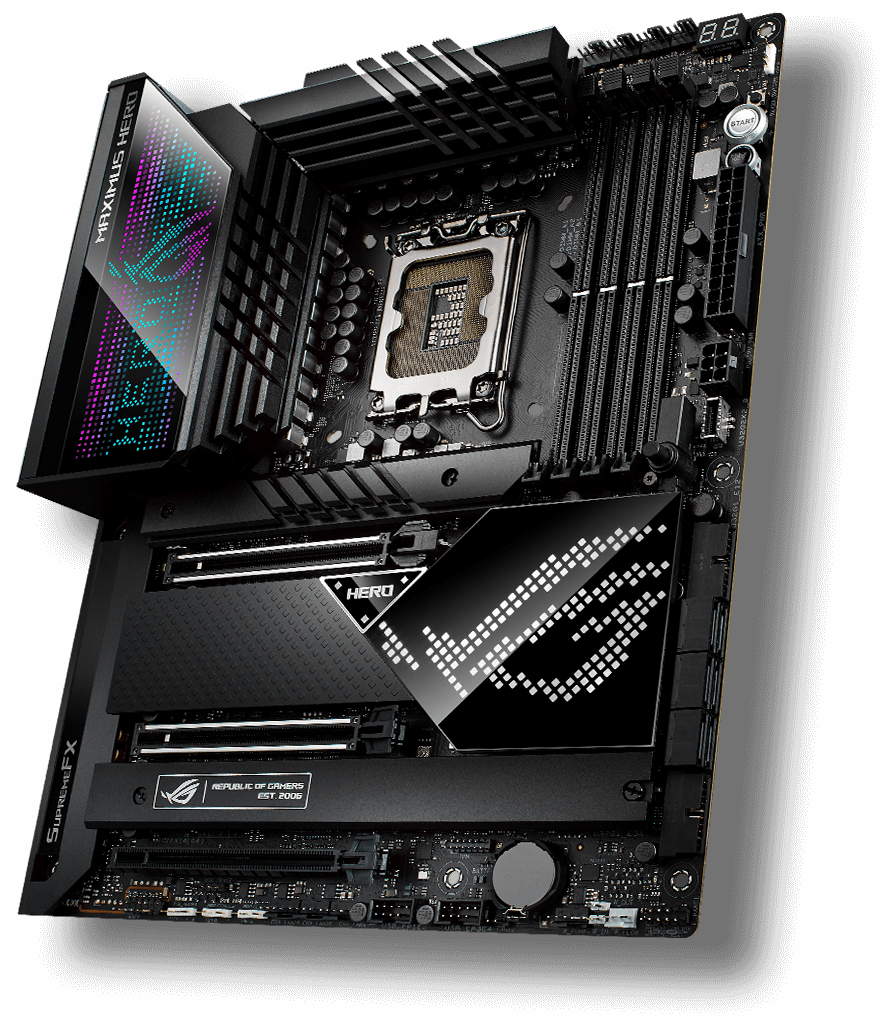
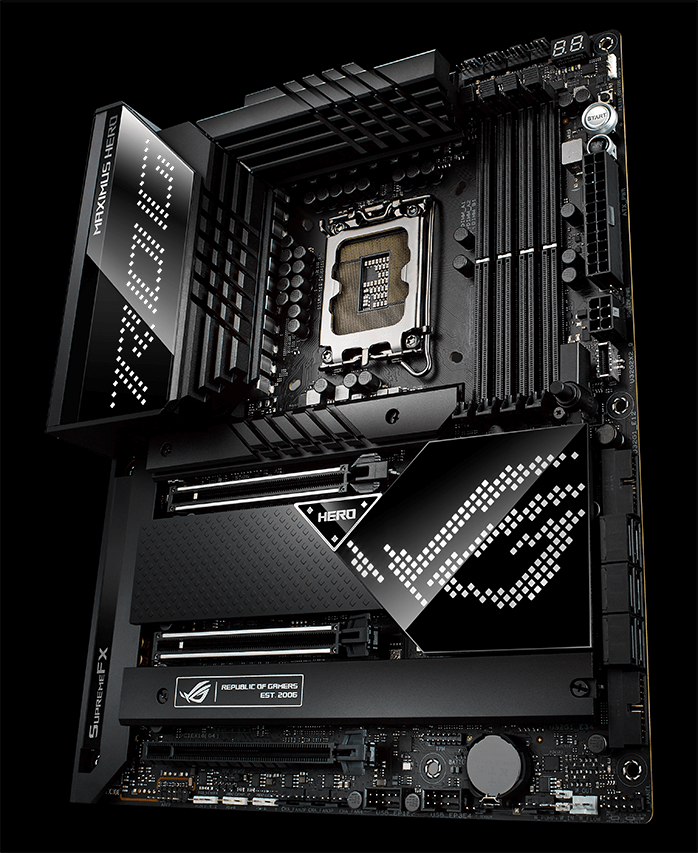
ROG Maximus Z690 Heroは、Republic of Gamers(ROG)のDNAの真髄とも言える製品で、Maximusシリーズを初めて購入するユーザーからマニアまで、すべてのユーザーを満足させるエネルギッシュなコンポーネントを搭載しています。優れた冷却性能、電源、接続性が最新の第12世代インテル® Core™ プロセッサーのあらゆる要求に応えます。また、多彩なライティングと最新のアニメーションで彩られたI/Oカバーは、目を見張るほどの輝きを放つ鮮やかなRGBロゴと模様を映し出し、ROG Maximus Z690 Heroの優れた性能を外観からも表現しています。

ROG ROG
intel CORE, intel CHIPSET Z690, Windows 11 Ready logos
The ROG Maximus Z690 Hero motherboard is designed for users who want to step into enthusiast territory.

インテリジェントなマザーボード

インテリジェントなソフトウェアソリューションは、システムが最高のパフォーマンスを発揮するために役立ちます。最新のASUS AIを利用した拡張機能は、オーバークロック、冷却、ネットワーキング、オンボードオーディオなど、DIY初心者でも簡単に高度な調整と最適化することができます。

AI Overclocking

チューニングはこれまでになく高速でスマートになりました。AI Overclockingは、CPUと冷却のプロファイルを作成して、各システムの最適な構成を予測します。

AI Overclockingの詳細

AI Cooling

AI Coolingはマザーボードに接続されたファンを自動的に管理・制御し、現在のシステム負荷と温度に応じて最も効率的な設定を保証します。

AI Coolingの詳細

AI Networking

GameFirst VIはネットワーク帯域幅を最適化して整理し、ジッターを効果的に削減し、スパイクラグを排除して、スムーズなオンラインゲームプレイを保証します。

AI Networkingの詳細

双方向AIノイズキャンセル

このユーティリティは、膨大な深層学習データベースを活用して、送受信の音声から5億種類以上のバックグラウンドノイズを低減し、ゲームや通話でのクリアなコミュニケーションを実現します。

双方向AIノイズキャンセルの詳細

スペック概要

  • パフォーマンス
  • 冷却
  • ゲームに没頭
  • 接続性
  • DIYがしやすい

究極のパワーとパフォーマンス

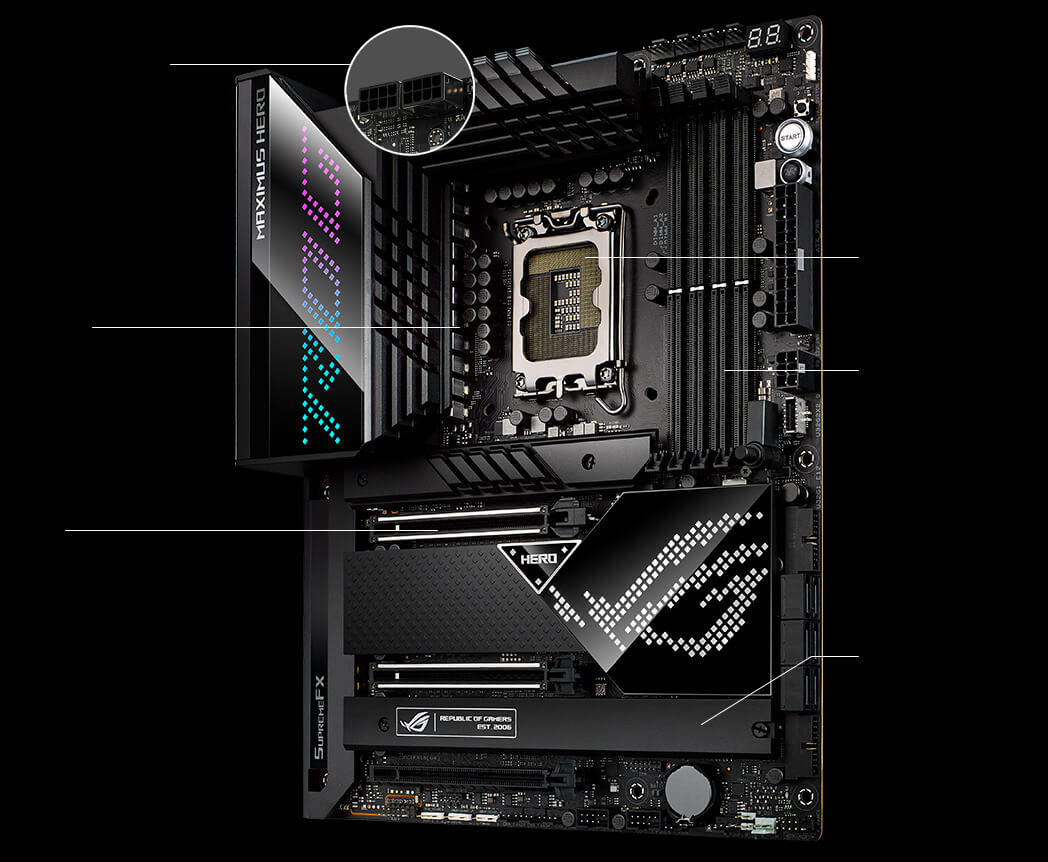
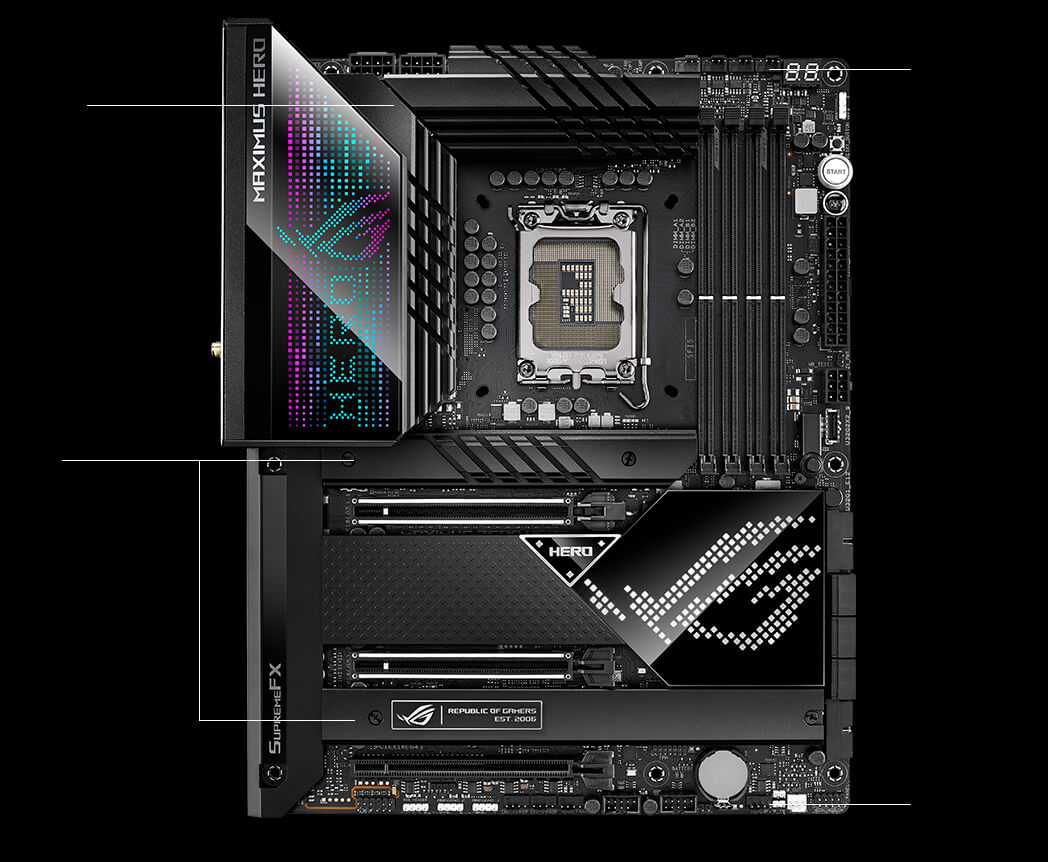
Performance specs of the ROG Maximus Z690 Hero Performance specs of the ROG Maximus Z690 Hero
  1. PROCOOL II 電源コネクタ
  2. 20+1 パワーステージ
  3. 拡張スロット

    ・ 2 x PCIe 5.0 x16 slots (x16, x8/x8)​

    ・ 1 x PCIe 4.0 x16 slot (x4, x4/x4 via ROG Hyper M.2 Card)

  4. 第12世代インテル® Core™、Pentium® Gold、Celeron® プロセッサーに対応したインテル® LGA1700ソケット
  5. DDR5, 4 X DIMM

    ・ デュアルチャンネル

  6. 3 X M.2 スロット

    ・ 1 x M.2 2242-22110 対応 PCIe 4.0 x4 モード

    ・ 1 x M.2 2242-2280 対応 PCIe 3.0 x4 モード

    ・ 1 x M.2 2242-2280 対応 PCIe 4.0 x4 & SATA モード

    2 X M.2 SLOTS VIA ROG HYPER M.2 CARD

    ・ 1 x M.2 2242-22110 対応 PCIe 5.0 x4/PCIe 4.0 x4 モード

    ・ 1 x M.2 2242-22110 対応 PCIe 4.0 x4 モード

包括的な冷却性能
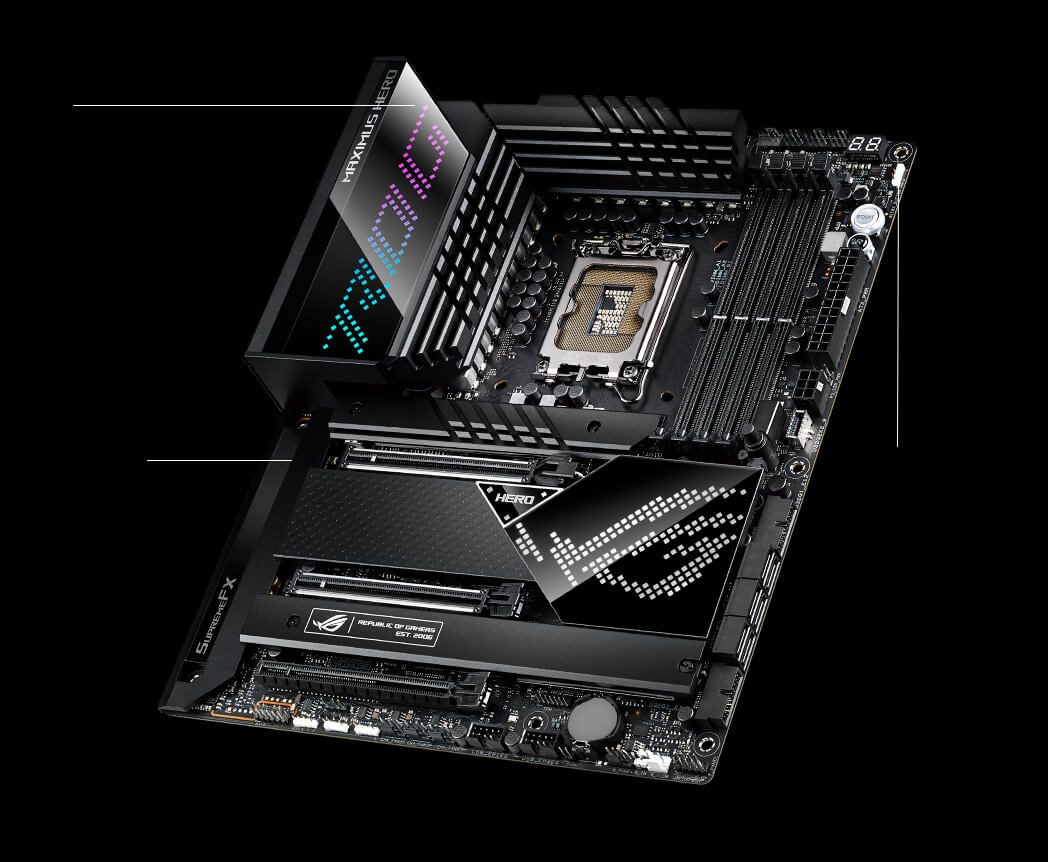
Cooling specs of the ROG Maximus Z690 Hero Cooling specs of the ROG Maximus Z690 Hero
  1. 統合されたI/OカバーとVRMヒートシンク
  2. トリプル M.2 ヒートシンク
    デュアル M.2 バックプレート
    BUNDLED ROG HYPER M.2 CARD WITH TWO M.2 HEATSINKS AND THERMAL PADS M.2ヒートシンクとサーマルパッドを備えたROG HYPER M.2 CARD
  3. 複数の4ピンPWMファンヘッダー

    ・ ASUS HYDRANODEをサポートするCHA_FAN1P-3Pヘッダー

  4. ROG水冷ゾーン

    ・ W_FLOWタコメーター

    ・ W_IN/OUT Tセンサー

ゲームに没頭
Gaming immersion specs of the ROG Maximus Z690 Hero Gaming immersion specs of the ROG Maximus Z690 Hero
  1. 多彩なライティング機能を備えたI/Oゾーン

    Polymo Lighting

  2. SUPREMEFX AUDIO ALC4082 コーデック

    ・ HD-DAC 「ESS® SABRE9018Q2C」

    ・ 120dB SNR ステレオ再生出力

    ・ 113dB SNR 録音入力

    ・ ゴールドプレートオーディオジャック

    SONIC STUDIO III + SONIC STUDIO VIRTUAL MIXER​ + SONIC SUITE COMPANION SONIC RADAR III DTS® SOUND UNBOUND​
  3. 3 X 3-ピン ADDRESSABLE GEN 2 RGB ヘッダー 1 X 4-ピン AURA RGB ヘッダー ARGB GEN2, POWERED BY AURA SYNC

完全な接続性

Connectivity specs of the ROG Maximus Z690 Hero Connectivity specs of the ROG Maximus Z690 Hero
  1. BIOS FLASHBACK™ ボタン
  2. CLEAR CMOS ボタン
  3. 1 X HDMI® ポート
  4. 2 X USB 2.0 ポート
  5. 2 X THUNDERBOLT™ 4 USB TYPE-C® ポート
  6. 1 X INTEL® 2.5GB ETHERNET ポート
  7. 7 X USB 3.2 GEN 2 ポート
    (6 X TYPE-A + 1 X USB TYPE-C®)
  8. 1 X WIFI 6E モジュール
  9. OPTICAL S/PDIF 出力
  10. 5 X ゴールドプレートオーディオジャック
  11. 1 X USB 3.2 GEN 2X2

    USB Type-C® QC4+をサポートするフロントパネルコネクタ

  12. 6 X SATA 6GB/S

DIYがしやすい

DIY-friendly specs of the ROG Maximus Z690 Hero DIY-friendly specs of the ROG Maximus Z690 Hero
  1. ROG特許取得済みのプリマウントI/Oシールド
  2. ESD GUARDS

    業界標準よりも優れた静電気保護。ESD Guardsは、USB、オーディオ、LANポートをカバーします。

  3. TRUEVOLT USB

    USB電源はすべてのUSBポートに安定した5Vを供給し、電力の変動を最小限に抑えてデータ損失を最小限に抑えます。

  4. 2 X SAFESLOTS

    PCIeデバイスの保持力とせん断抵抗を強化します。

  5. ASUS HYDRANODE

    3つのシャーシファンヘッダーは、ASUS HYDRANODE回路を備えています。この回路は、電力線通信プロトコルを利用して、各4ピンコネクタを介して最大3つのデイジーチェーン接続されたファンを個別に制御します。

  6. Q-CODE

    Q-Code LEDの設計は、システムのステータスを表示する2桁のエラーコードを提供します。

  7. 4 x Q-DIMM

    片面クリップなので、メモリモジュールの取り扱いがとてもシンプルで安全です。

  8. FLEXKEY

    FlexKeyはデフォルトの状態でシステムリセットボタンとして機能しますが、Auraライティングをすばやくオン/オフにしたり、セーフブートを有効にしたり、BIOSに入るように手軽に設定することもできます。

  9. PCIE SLOT Q-RELEASE

    物理的なボタンにより、第1PCIeスロットのセキュリティラッチを1回のタップで解除することができ、最新のGPUや互換性のある他のデバイスにアップグレードする際に、PCIeカードをマザーボードから取り外す手間が大幅に減ります。

  10. M.2 Q-LATCH

    革新的なQ-Latchは、ツールなしでM.2 SSDの取り付け、取り外しを簡単に行うことができます。従来のネジを廃止し、シンプルなロック方式でドライブを固定することができます。

  11. Q-CONNECTOR

    すべての前面パネルケーブルを並べ替えます。

    Q-CONNECTOR

スペック概要

  • 電源ソリューション
  • メモリ

パフォーマンス

特別に設計された電源と最新の高性能メモリーをサポートするROG Maximus Z690 Heroは、Intel Alder Lake-Sプロセッサーの要求に簡単に応えます。90Aの高性能VRMに加え、厳選されたコンポーネント、最適化されたメモリーレイアウトによりバランスの取れたパフォーマンスを実現し、戦闘力の高いリグを目指すマニアの望みをかなえます。

チーム化されたパワーアーキテクチャ

今日のCPUアーキテクチャは、ディープパワーセービングモードから低電力モードまで、瞬時に全負荷を移行することにより、マザーボードの電源設計にとてつもない負担をかけます。ASUSの最新VRMアーキテクチャは、模範的な熱性能を維持しながら、チーム化されたパワーステージを利用して電流を迅速に流すことにより、チャレンジに対応します。

  • 簡単な歴史
  • CPU需要の変化
  • トレンドに逆らう
  • 熱性能
  • 高品質のコンポーネント

チーム化された
パワーデザイン

12V EPS IN

12V EPS IN

ダブラーは効果的なフェーズの数を増やすのに役立ちますが、実行するには処理が遅れてしまいます。 チーム化されたアーキテクチャにより、2つのパワーステージが連携して動作し、CPUにより多くの電力を供給できます。 PowerStage内のMOSFETは、電圧変換と12V EPSコネクタからCPUへの供給を担当するため、発生する熱が最も多くなります。

従来の
フェーズダブラーデザイン

12V EPS IN

12V EPS IN

  • 2005年にA8N32-SLI Deluxeマザーボードを出荷したASUSは、位相ダブラーを実装した最初のメーカーになりました。ボードのVRMは、当時利用可能であったコンポーネントの電力処理能力をいとも簡単に克服し、電圧リップルを削減したことで賞賛されました。これらの利点のためにフェーズダブラーが業界で広く受け入れられるようになり、今日でも同様の目的で使用されています。

  • ただし、現在のCPUは前世代よりも多くのコアを搭載しており、最新の命令セットを使用すると、計算量の多いワークロードを驚くほどのペースで処理できます。もう一つのメリットは、アイドル時の消費電力が少なくなり、負荷状態間をより迅速に移行できることです。フェーズダブラーは過渡応答を妨げる伝搬遅延を追加するため、これらの改善には電力設計の優先順位の再評価が必要となります。

  • 幸いなことに、最新の統合型の電源コンポーネントは昨年のデバイスよりも高い電流を処理できるため、フェーズダブラーの処理遅延に影響を受けない単純な回路トポロジを実装できます。そのため、ROG Maximus Z690 Heroは、チーム化されたパワーステージを使用して、フェーズごとに高い電流バーストを提供し、フェーズ2倍設計の熱性能を維持するのです。

  • 各VRMコンポーネントは特定の目的を果たします。PWMコントローラーとフェーズダブラーは回路を制御し、パワーステージは電気的と熱的な観点から重い負荷をかけます。そのため、ROG Maximus Z690 Heroは20+1のパワーステージを利用しています。Infineonの製品ラインナップの最上位に位置するパワーステージは低RDSONを特長としており、スイッチングと伝導損失を低減し、全体的なサーマルヘッドルームの改善に役立ちます。

The ROG Maximus Z690 Hero features 20+1 power stages rated for 90A.
  • 8+8-pin ProCool II Power Connectors
  • 20+1 power stages
  • MicroFine Alloy Chokes
  • 10K black metallic capacitors
  • デュアル8ピン ProCool II電源コネクタ

    2つのProCoolコネクタにより、EPS 12V電力線への確実な接続が保証されます。

  • 20+1 パワーステージ

    VRMには20+1のパワーステージが搭載されており、それぞれ90Aに対応しています。

  • MicroFine合金チョーク

    各パワーステージには、45アンペアを処理できる高透磁率の合金コアチョークが付いています。

  • 10Kブラック金属コンデンサ

    入力と出力のフィルタリングは、高い動作温度で数千時間持続する固体高分子コンデンサによって提供されます。

DDR5オーバークロック強度

包括的なメモリチューニングオプションは、ROGマザーボードの基礎となるものです。Maximus Z690のDDR5では、ラインナップは、高速キットだけでなく、ロックされたパワーマネジメントIC(PMIC)を持つエントリーレベルのメモリモジュールでもパフォーマンスの限界を打ち破ります。

The ROG Maximus Z690 Hero features DDR5 memory
  • マザーボード上の専用回路は、DDR5メモリのPMICの制限を安全に回避し、デフォルトの1.1ボルトの制限を超えて、周波数とタイミングを最大限に引き上げることができます。
  • 通常、制限されたPMICのロックを解除するには、メモリの電圧を調整するたびにシステムを完全にパワーサイクルさせる必要があります。ROGマザーボードは、オンボードのハードウェアとファームウェアを活用して、この厄介な制限を巧みに回避し、前世代のDDRメモリに採用されているのと同じソフトシステムリセットプロセスによって電圧調整を行うことができます。
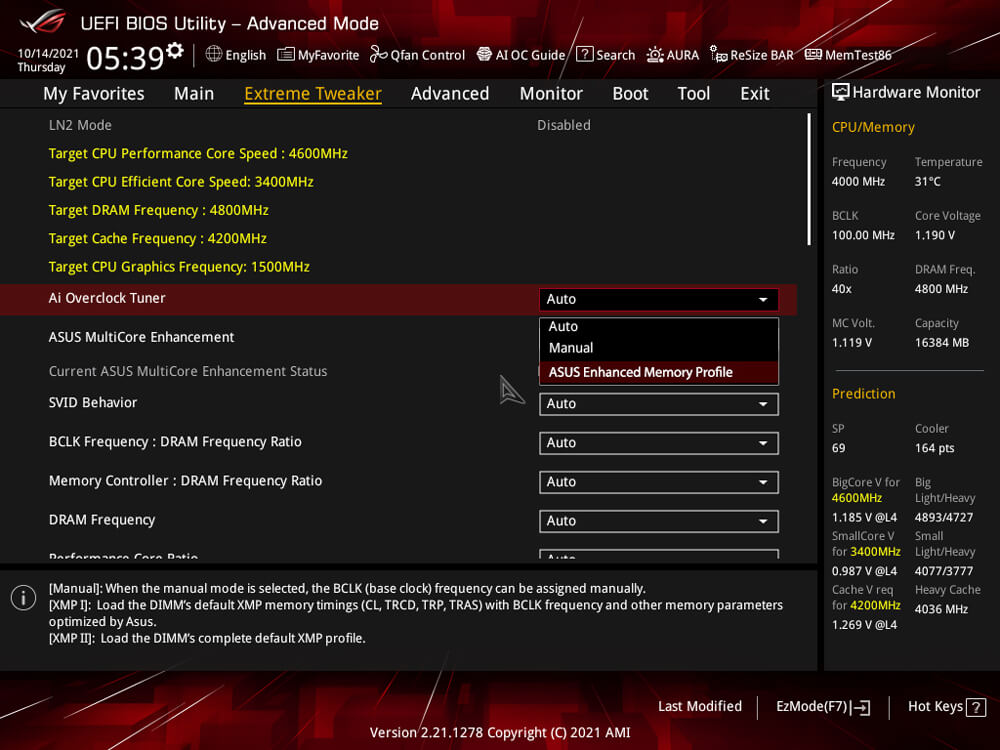
UI featureing ASUS Enhanced Memory Profile (AEMP)

ASUS Enhanced Memory Profile (AEMP)は、PMIC制限のあるメモリモジュール専用のファームウェア機能です。AEMPはキット上のメモリチップを自動的に検出し、最適化された周波数、タイミング、電圧のプロファイルを提示しますので、簡単に適用してパフォーマンスを引き出すことができます。

  • ヒートシンク
  • ヘッダー

冷却

最高レベルのPC性能を発揮するためには、卓越した冷却が必要です。ROG Maximus Z690 Heroは、バランスの取れた質量と表面積で確実に放熱を行う、堅牢なVRMとチップセット用ヒートシンクを備えています。また、AIOあるいは専用に設計された冷却ループを搭載しており、お好みのファンと組み合わせることで、完璧に熱を制御することができます。

冷却力の高い設計
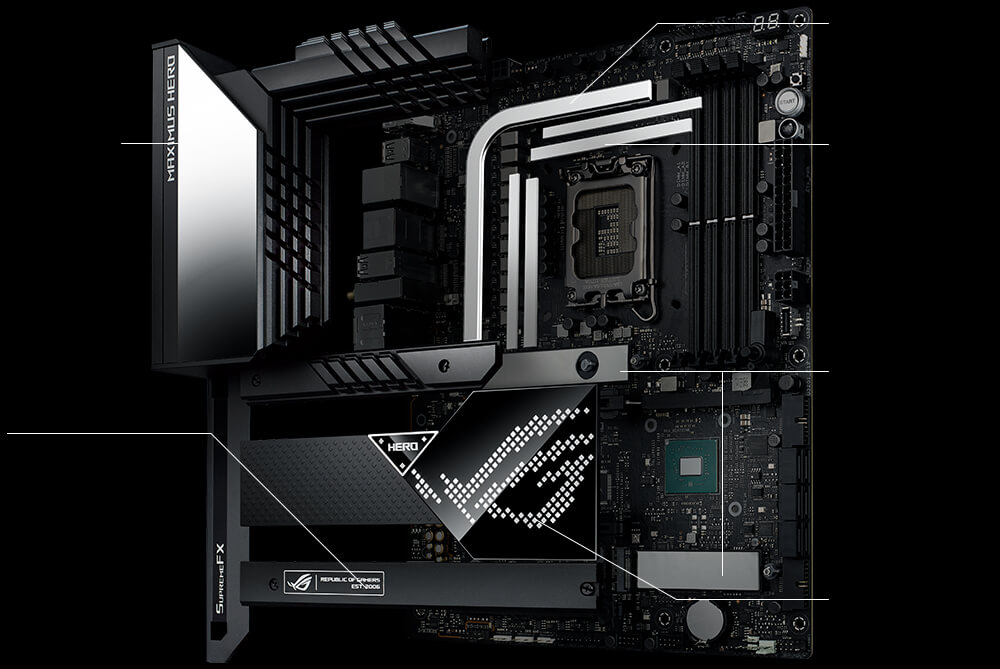
The ROG Maximus Z690 Hero features upgraded cooling solution. The ROG Maximus Z690 Hero features upgraded cooling solution.
  1. VRMヒートシンク

    VRMヒートシンクはMOSFETとチョークに配置され、埋め込み型のヒートパイプはアルミニウムI/Oカバーに接続されています。

  2. M.2 ヒートシンク

    3つの専用ヒートシンクにより、最大3台のM.2ドライブを最適な動作温度範囲に保ち、安定した性能と信頼性を実現します。

  3. L字型ヒートパイプ

    L字型のヒートパイプにより、VRMからの迅速かつ均一な熱伝達が可能になります。

  4. 高導電性サーマルパッド

    高品質のサーマルパッドは、パワーステージで発生した熱をヒートシンクにブリッジングすることで、システムからの全体的な熱伝達を改善します。

  5. M.2バックプレート

    デュアルM.2スロットにバックプレートブロックを採用することで、風量に制限がある状況下でも、高性能ドライブが最高のパフォーマンスを発揮できます。

  6. チップセットヒートシンク

    専用のチップセットヒートシンクが熱を取り除き、最適な動作温度を維持します。

  • 熱対策
  • ROG水冷ゾーン
ROG Maximus Z690 Hero
  • Multiple temperature sources
  • 4-pin PWM/DC fan headers and ASUS HYDRANODE
  • AIO pump
  • Water pump+
  • Water in/out
  • Water flow
  • 熱対策
  • ROG水冷ゾーン

熱対策

ROG Maximus Z690 Heroは、これまでで最も包括的な冷却手段を備えています。

  • 複数の温度源
  • 4-ピン PWM/DCファンヘッダーとASUS HYDRANODE
  • AIOポンプ
  • 各ヘッダーは、ワークロードに基づく冷却のために、ユーザーが構成できる3つの温度センサーに対して監視・反応するように設定できます。また、すべての設定はFan Xpert 4またはUEFIで簡単に管理できます。

  • すべてのオンボードヘッダーは、PWMまたはDCファンを自動検出し、3つのシャーシファンヘッダーがASUS HYDRANODEをサポートします。

  • 自己完結型の水冷設定用の専用PWM/DCヘッダー。

ROG水冷ゾーン

デュアル水温ヘッダーと流量ヘッダーはAI Suiteユーティリティに直接情報を供給し、冷却液の温度とループ全体の流量を追跡できます。

  • ウォーターポンプ+
  • 水の出入り
  • 水の流れ
  • 専用のヘッダーは高性能のPWMまたはDCのウォーターポンプに3アンペア以上を供給できます。

  • 専用ヘッダーにより、コンポーネントの入力・出力ポイントの温度を監視できます。

  • 専用ヘッダーにより、ループ全体を通して流量を常に監視できます。

  • ネットワーク
  • USBポート
  • ストレージ
  • オーディオ

接続性

最新の接続ソリューションであるWiFi 6E、PCIe® 5.0、2つのThunderbolt™ 4 USB Type-C®ポートにより、スムーズな接続と高速ファイル転送を実現します。また、Hi-Fiオーディオを求めるユーザーのためにSupremeFX ALC4082コーデックを搭載することで、PCIeスロットを使用しなくても、ゲームへの没入感を高めることができます。

  • Intel WiFi 6E (Gig+)

    オンボードWiFi6E テクノロジーは、6GHz帯域で新たに利用可能な無線スペクトルを利用し、5GHz帯域の最大3倍の帯域幅と最大7つの160MHz帯域を提供して、容量の向上とパフォーマンスの向上とともに超高速ワイヤレスネットワーク速度を実現します。

  • Intel 2.5 Gb イーサネット

    オンボードのIntel ® 2.5 Gbイーサネットは、有線接続を強化し、標準のイーサネット接続の2.5倍の速度で、高速なファイル転送、スムーズなラグのないゲーム、高解像度ビデオストリーミングを実現します。

  • WI-FI GIG+ 6 BY INTEL

    ・Wi-Fi 6E(6GHz帯)の通信は、各国/地域によって規制が異なる場合があります。6GHz帯をご利用になる場合は、国/地域の法規制などの条件をあらかじめご確認ください。
    ・Wi-Fi 6E(6GHz帯)は、Windows® 11以降で提供される予定です。
    ※予定は変更となる場合があります。
    ・Wi-Fi 6E(6GHz帯)対応ドライバーは、Intel®が各国の6GHz帯における認証を取得後、Windows®Updateを介して提供される予定です。


  • ・Wi-Fi 6E(6GHz帯)の利用には、OS、ドライバー、無線LANルーターのすべてが対応している必要があります。
    ・日本国の電波法に基づく規制により、今後本製品が6GHz帯に対応することを保証するものではございません。
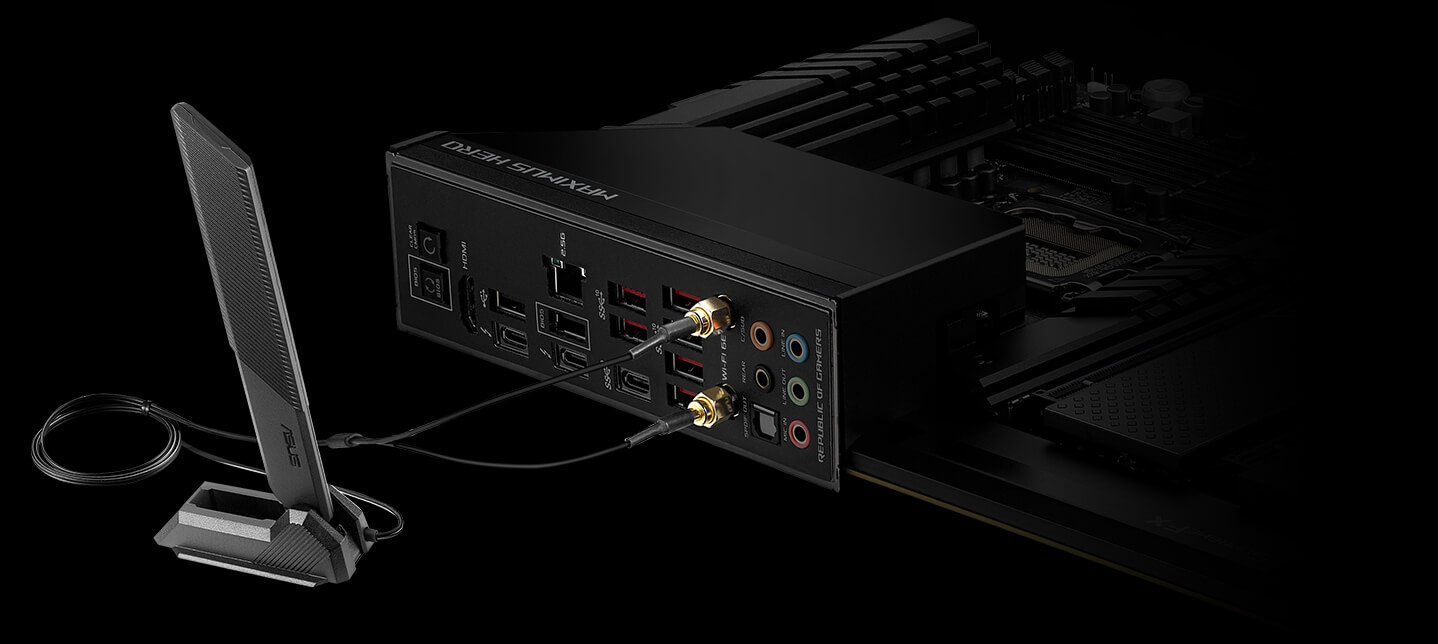
The ROG Maximus Z690 Hero motherboard features WiFi 6E, along with 2.5 Gb Ethernet.
  • WiFi 6E antenna

    アンテナには、より高速な伝送速度を可能にする2つの送信機と受信機が組み込まれており、2.4、5、および6GHz帯域をサポートします。

  • 調節可能なデザイン

    4方向のポジショニングにより、信号の受信が向上します。

  • 磁気ベース

    強力な磁気ベースがアンテナをPCケースの上部または側面に固定します。

*WiFi 6Eの可用性と機能は、規制上の制限と5 GHzWiFiとの共存に依存しています。 ASUS WiFi 6エコシステムの詳細については、 asus.com/jp/content/WiFi6/#WIFI-6Eをご覧ください。
  • USB 3.2 Gen 2x2 Type-C® フロントパネルコネクタ、Quick Charge 4+搭載

    USB 3.2 Gen 2x2にはレーンが追加され、Type-Cのデータ転送を最大20 Gbpsまで高速化することができます。また、このポートにはQuick Charge 4+テクノロジーが搭載されており、PCIe電源ケーブルを近くの6ピンコネクターに接続することで、最大60Wまでの機器の急速充電が可能です。

    The ROG Maximus Z690 Hero motherboard features USB 3.2 Gen 2x2 front-panel connector with quick charge 4+
  • 2つのオンボードThunderbolt 4 USB Type-C® ポート

    各ポートは、最新の高速デバイスやドライブに対応するため、最大40Gbpsの双方向の帯域幅を実現しています。また、Thunderbolt 4は、最大2台の外部4Kディスプレイをサポートし、PCIeの帯域幅を最大32Gbpsまで拡張します。

    The ROG Maximus Z690 Hero motherboard features two Thunderbolt 4 Type-C ports
  • The ROG Maximus Z690 Hero motherboard features USB 3.2 Gen 2x2 front-panel connector with quick charge 4+
  • The ROG Maximus Z690 Hero motherboard features two Thunderbolt 4 Type-C ports
  • 3つのオンボードM.2スロット

    ROG Maximus Z690 Heroは、3つのオンボードM.2スロットを搭載しており、うち2つは最新のPCIe 4.0 SSDに対応しています。

    The ROG Maximus Z690 Hero motherboard features three M.2 slots, with two support PCIe 4.0
  • ROG HYPER M.2 CARD
    PCIe 5.0 READY

    さらに多くのM.2ストレージや高速なデータ転送が必要な場合は、付属のROG Hyper M.2カードに搭載された2つのスロットを利用することができます。ROG Hyper M.2カードのスロットの1つはPCIe 5.0で、付属のPCIe 4.0スロットの最大2倍の速度※を実現します。

    ※取り付けるPCIeスロットにより速度が異なります。
    The ROG Maximus Z690 Hero motherboard features a bundled ROG Hyper M.2 Card with two M.2 sockets support PCIe 5.0
  • The ROG Maximus Z690 Hero motherboard features three M.2 slots, with two support PCIe 4.0
  • The ROG Maximus Z690 Hero motherboard features a bundled ROG Hyper M.2 Card with two M.2 sockets support PCIe 5.0

SupremeFX

ROG SupremeFXオーディオテクノロジーは、ライン入力接続で並外れた113dBの信号対雑音比を実現し、史上最高の録音品質を提供します。また、SupremeFX ALC4082コーデックへのよりクリーンな電力供給のための低ドロップアウトレギュレーターと、-115dB THD + Nに到達できるESS® 9018Q2C統合DACがあり、オーディオトラックのすべての繊細さとニュアンスを伝える再生を提供します。
››› ROGオーディオテクノロジーの詳細はこちら

  • オーディオラインシールド
  • ESS® SABRE9018Q2C
  • ALC 4082 コーデック
  • スイッチングMOSFETS
  • コンデンサ
  • マザーボードまたはアドオンからの電磁干渉を遮断して、よりクリーンなオーディオを実現。

  • ESS® SABRE9018Q2C統合DACアンプは、オーディオトラックのすべての微妙なニュアンスを伝える再生用に-115 dBの全高調波歪み(THD + N)を提供できます。さらに、121 dBのダイナミックレンジ(DNR)は、非常に低いノイズフロアを提供し、ダイナミクスを強調します。

  • ALC4082コーデックは、従来のハイレゾオーディオ(HDA)インターフェースの代わりにUSBインターフェースを使用し、再生オーディオの解像度を192〜384kHzに向上させます。

  • 独自の設計により、コーデックのインピーダンス検出機能をフロントまたはリアのヘッドフォンに出力できます。

  • より温かみのある自然なサウンドを、クリアで精細に表現する高品質なコンポーネントです。
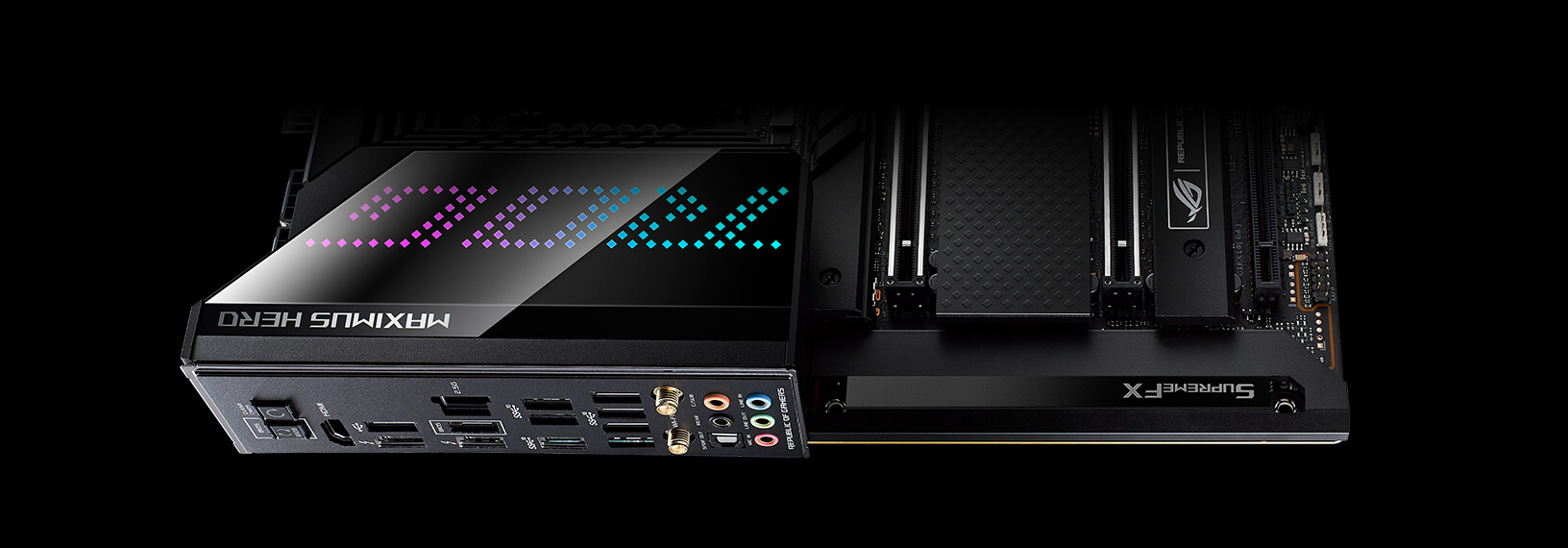
The ROG Maximus Z690 Hero motherboard features SupremeFX
  • Audio line shielding
  • ESS® SABRE9018Q2C
  • ALC 4082 codec
  • Switching MOSFETS
  • Capacitors
  • 5-Way Optimization
  • BIOS
  • 差動センシング

最適化

ROG Maximus Z690 Heroには、直感的でフレキシブルなツールが搭載されており、より高いレベルでシステムパフォーマンスをコントロールすることができます。

パフォーマンスのレベルアップ

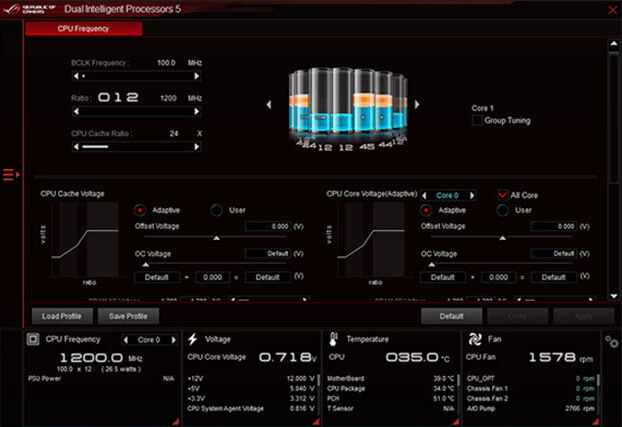
AI Suite 3のダッシュボードスタイルのコントロールパネルを使用すると、ROG Maximus XIIIHeroシステムのほぼすべての側面を簡単に微調整できます。 1つのシンプルで直感的なインターフェースを介して、パフォーマンス、冷却、安定性、効率の最適なバランスを実現します。

  • TPU
  • EPU
  • Fan Xpert 4
  • Digi+電力制御
  • Turbo Core app
5-way optimization UI features CPU-performance boost

CPUパフォーマンスの向上

TurboV Processing Unit (TPU)は、電圧の微調整、システム統計の監視、オーバークロックパラメータの調整など、システム調整機能の数々を提供するインテリジェントなオンボードマイクロコントローラーです。
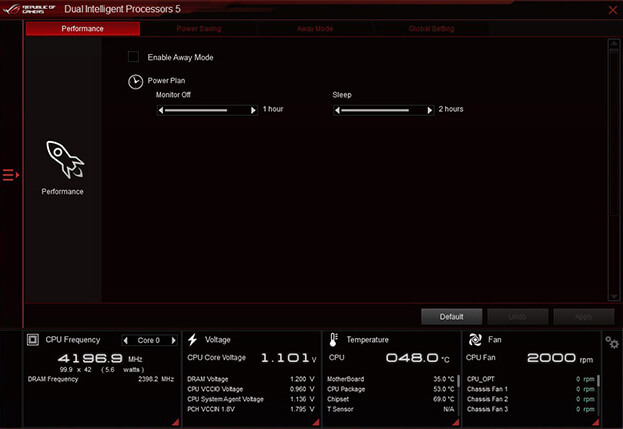
5-way optimization UI features All-around energy efficiency

総合的なエネルギー効率

Energy Processing Unit (EPU)を使用すると、システム全体の電力を節約できます。EPUは自動的に電力消費を最適化し、アウェイモードで最大限の節約を実現します。これは、未使用のI/Oコントローラーをシャットダウンすることにより、大幅な省エネを実現するスマート設定です。
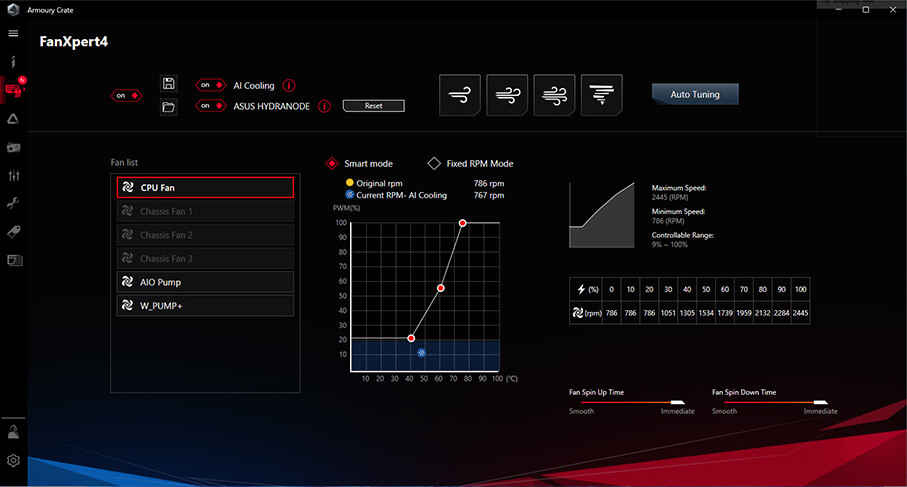
5-way optimization UI features Flexible cooling controls for air or liquid

空冷・液冷に対応した柔軟な冷却制御

Fan Expert 4またはUEFIを使って、ファン、ウォーターポンプ、オールインワン(AIO)クーラーを包括的に制御することができます。空冷でも水冷でも、ワンクリックですべてのパラメータをインテリジェントに設定できるファンチューニング機能を搭載しています。また、Extreme Quietモードでは、すべてのファンの回転数をデフォルトの最小値以下に抑えることができ、軽作業を行う際にシステムを静かに保つことができます。
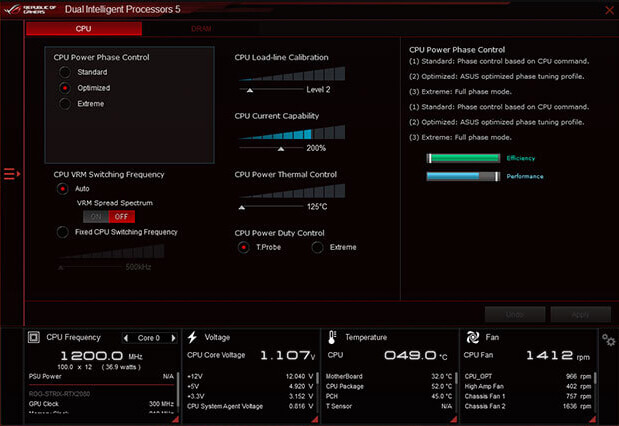
5-way optimization UI features Precise digital power control

精密なデジタル電力制御

Digi+電力調整モジュール(VRM)は、電圧ドループ、スイッチング周波数、および電力効率設定をリアルタイムで制御し、CPU電圧調整を微調整して究極の安定性とパフォーマンスを実現します。

5-way optimization UI features Turbo Core app

Turbo Core アプリ

インテルプロセッサーはコアごとのチューニングを備えており、ASUS Turboアプリは特定のプロセッサーコアにアプリケーションを割り当て、コンピューティングパワーを最も必要な場所に優先させることで、この機能を利用します。

UEFI BIOS

名高いROG UEFI(BIOS)は、お持ちのPCの構成、調整、チューニングに必要なものをすべて提供します。PCのDIY初心者向けに特化して簡素化されたオプションだけでなく、エキスパート向けの包括的な機能も特徴です。

  • Advanced モード
  • EZ モード
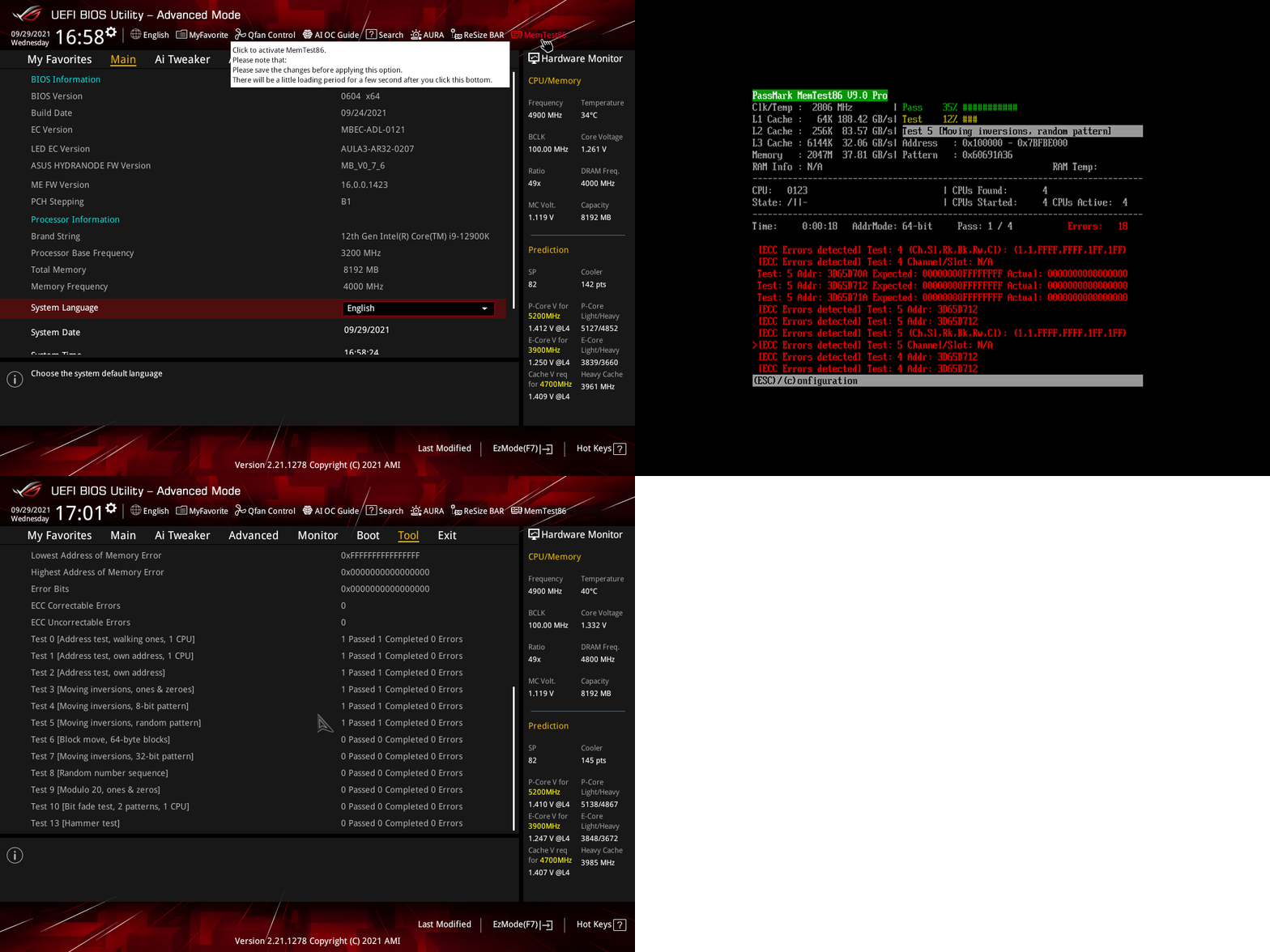
MemTest86

MemTest86

MenTest86はROG UEFI(BIOS)にプリインストールされています。テストを実行すると、USBスティックやOSに入ることなく、ワンクリックでメモリの問題をピンポイントで指摘することができます。メモリレポートはBIOSアーカイブに保存され、参照することができます。

ROG UEFI BIOS UI features Advanced mode

さらに深く掘り下げる準備ができたら、USFIの詳細モードを詳しく調べて制御できます。Advanced モードでは、マザーボードのあらゆる側面を完全に制御できます。また、検索機能より、必要な設定をすばやく見つけることができます。

Advanced モード

  • MemTest86 詳細

    データの破損やクラッシュの原因となるRAMとメモリの障害の問題を診断します。

  • My Favorites

    チューニングオプションをすばやく見つけて、好みのツールをリストに追加します。

  • EZ Flash 3

    BIOS内からインターネット経由で最新のBIOSに更新できます。

  • S.M.A.R.T.

    ストレージデバイスの自己監視、分析、およびレポートテクノロジのログを確認して、信頼性を測定し、潜在的な障害を特定します。

  • GPU POST

    選択したASUSグラフィックスカードを自動的に検出して、詳細情報を表示します。

  • Secure Erase

    SSDを工場出荷時の状態に復元します。

  • Last Modified Log

    最新の変更を追跡し、優先プロファイルをUSBドライブに保存します。

  • SATA Port Renaming

    簡単に識別できるように、SATAポートの名前を変更します。

  • ASUS User Profile

    異なるBIOSバージョン間で構成設定を友人と共有することができます。

  • Q-Fan control

    ファンの動作速度を手動で構成するか、事前構成されたファンプロファイルを使用して、標準、サイレント、ターボ、またはフルスピードモードをすばやく選択します。デフォルトでは、温度が75度に達すると、システムファンは自動的にフルスピードに切り替わります。
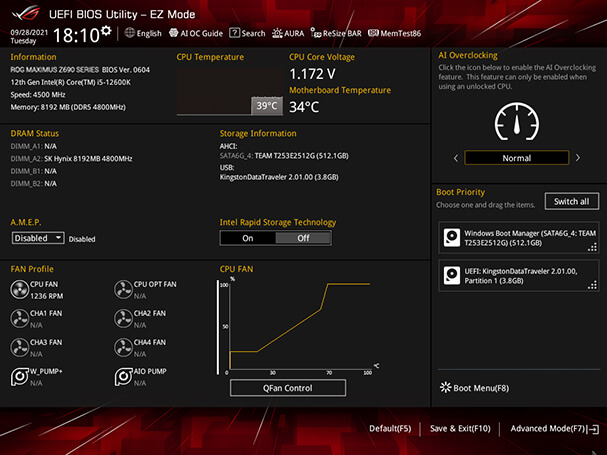
ROG UEFI BIOS UI features EZ mode

セットアップを簡単にするために設計されたEZモードでは、重要な設定や統計情報が1ページに表示されます。ガイド付きウィザード、ドラッグ&ドロップ機能、重要な設定をワンクリックで行うことができます。

EZ モード

  • 直感的なグラフィカルファンコントロール

    カーブをマウスでドラッグするだけで、個々のファンを微調整することができます。

  • SATA information

    SATAポートの詳細を表示し、デバイスの認識を容易にします。

  • Fast and easy clock adjustment

    マウスを使って、時間と日付の設定をすばやく変更できます。

  • Aura On/Off mode (Stealth)

    Aura RGBライティングや各オンボードLEDを簡単に有効/無効にでき、より落ち着いた美しさを実現します。

正確な電圧監視

従来のマザーボードは、ノイズの影響を受けやすく、正確な監視には理想的ではない場所から電圧レールをタップする必要があるシングルエンドのセンシング回路を使用しています。これらの問題により、コンポーネントに供給される電圧とソフトウェアに報告される値の間に大きな差異が生じます。ROG Maximus Z690 Heroは、ノイズを除去し、CPUと主要な電圧レールのエンドポイントから直接読み取り値を取得する差動検出回路を備えています。これにより、電圧をより正確に追跡できるため、オーバークロックとチューニングが簡素化されます。

ROG Maximus Z690 Hero features accurate voltage monitoring
  • Aura Sync
  • ゲーミングオーディオ
  • Armoury Crate
  • AIDA64 Extreme
  • グラフィックカードホルダー

パーソナライズ

ROG Maximus Z690 Heroは、優れたパフォーマンスに加えて、多彩な光を映し出すディスプレイを採用することで、人目を引く繊細な光で美しく彩られたI/Oカバーを実現しました。この複雑なデザインは、2つのRGBパターンを備えており、他では見られない光り輝くRGBスタイルでビルドを個性的に演出できます。

ゲームの世界を広げる

グラフィックカードやモニターからマウスやキーボードまで、ROGコンポーネントに対応します。そして、補完的な美学、制御、互換性でゲームを盛り上げましょう。 ROGエコシステムは、競合するどのブランドよりも広範であるため、システムが拡張するにつれて、より多くの選択肢を楽しむことができます。

  • Static
  • Breathing
  • Strobing
  • Rainbow
  • Color cycle
  • Starry night
  • Music effect
  • Smart
  • Adaptive color
  • Dark
ROG Maximus Z690 Hero features Aura Sync
Addressable Gen 2 RGB Header

アドレサブル Gen 2 RGB ヘッダ

ARGB GEN2, POWERED BY AURA SYNC

アドレス指定可能なGen2 RGBヘッダーには、特定のデバイスに合わせて照明効果を自動的に調整できるソフトウェアが搭載されています。新しいヘッダーは、既存のAuraRGBギアとの下位互換性もあります。

  • Sonic Studio III
  • DTS : SOUND UNBOUND

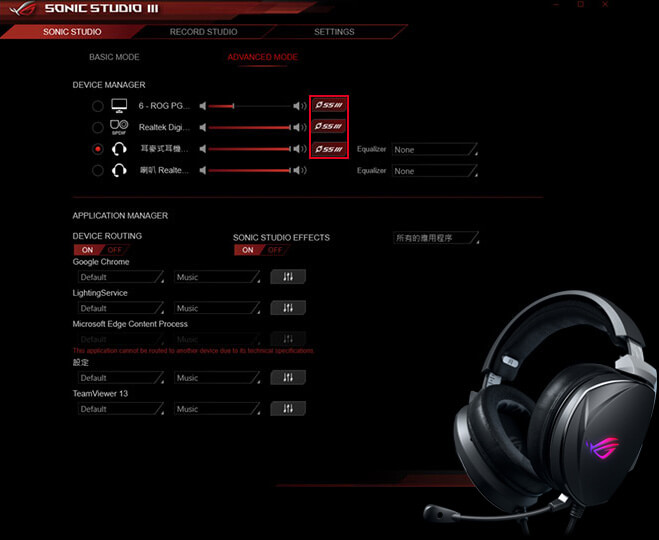
Sonic Studio III

ROG Sonic Studioは、VRヘッドセットのHRTFベース(頭部関連伝達関数*)のバーチャルサラウンドに対応しており、アクションに深く引き込まれるような没入感のある聴覚風景を作り出します。また、直感的に操作できるSonic Studioインターフェースには、様々なEQオプションやワンクリックプリセットが用意されており、個人の好みやヘッドセットの特性に合わせて音響を調整することができます。

*頭部伝達関数とは、ダミーヘッドを介して記録された音声データから生成された音声アルゴリズムです。テストトーンは、ダミーヘッドの周りの球形グリッドから再生され、異なる方向から来る音の微妙な変化を取得します。 アルゴリズムはSonic Studioのバーチャルサラウンド機能に統合され、リアルな音声を再現します。

››› Learn more about Sonic Studio III
  • Sonic Studio link
  • App-specific profiles
  • Sonic Studio virtual mixer
Sonic Studio III UI features Sonic Studio link

Sonic Studio link

新たに搭載された「Sonic Studio Link」では、すべての再生機器にエフェクトをかけることができます。Sonic Studio Linkのボタンを押すだけで、接続されているすべてのデバイスでエフェクトを楽しむことができます。
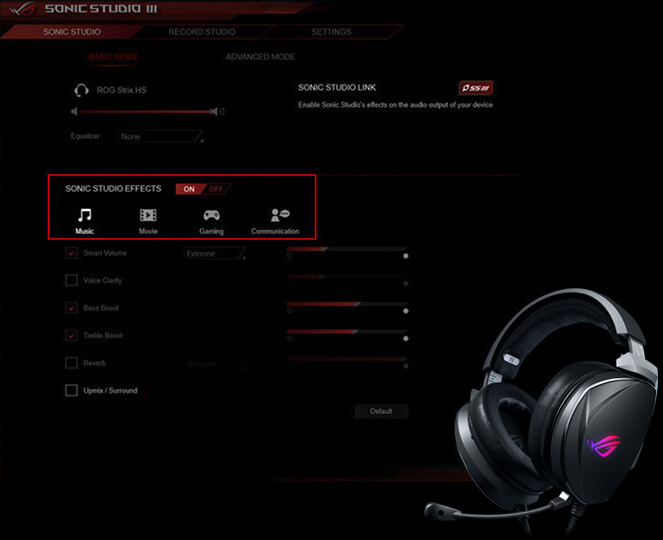
Sonic Studio III UI features App-specific profiles

アプリケーションごとの設定

カスタマイズされたオーディオ設定を様々なアプリケーションに適用して、それぞれが聴きたい方法に完全にチューニングされます。
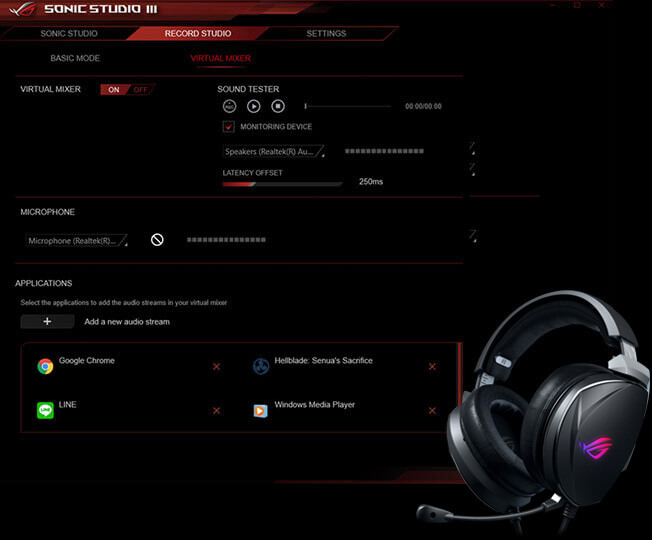
Sonic Studio III UI features Sonic Studio virtual mixer

Sonic Studioバーチャルミキサー

選択したアプリからオーディオ出力をマイク入力からのオーディオと結合し、コンパイルされたミックスをストリーミングします。

DTS : Sound Unbound

ROG Maximus Z690 Heroには、DTS® Sound Unbound™アプリがプリインストールされており、これまでにないほどオーディオを包み込み、全く新しいレベルの没入感を生み出して、並外れたゲームやエンターテイメント体験を実現します。Windows Sonicの空間技術を活用することで、DTS Sound Unboundは仮想3D空間でオーディオを配信します。サウンドスケープの真ん中にいるような感覚で、仮想環境での銃声、足音、その他の音の位置と方向を感じることができます。
*DTS Sound Unboundはゲーム内でのサポートが必要です。サポートされているタイトルはゲーム開発者に確認してください。

dts
  • Stereo Sound

    Stereo Sound

  • Surround Sound

    Surround Sound

  • Spatial Sound

    Spatial Sound

Armoury Crate

Armoury Crateは、サポートされているゲーミング製品を集中的にコントロールできるように設計されたソフトウェア・ユーティリティで、システムのルック&フィールを簡単に調整することができます。単一の直感的なインターフェースから、Armoury Crateは、互換性のあるデバイスのRGBライティングとエフェクトを簡単にカスタマイズし、Aura Syncと同期させて、システム全体で統一されたライティングスキームを作成することができます。また、Armoury Crateを使用して、ドライバ、ソフトウェア、ユーザーマニュアルをダウンロードすることもできます。さらに、Armoury Crateには専用の製品登録ページやニュースフィードがあり、ゲームコミュニティとの連絡を取りやすくなっています。
ダウンロード ›››

  • AURA SYNC
  • Fan Control
  • デバイス構成
  • ドライバーとマニュアルのダウンロード
  • ゲーミングハイライト
  • アカウント管理
AURA SYNC
Fan Control
Device Configuration
Driver & Manual Download
Gaming Highlight
Account Management

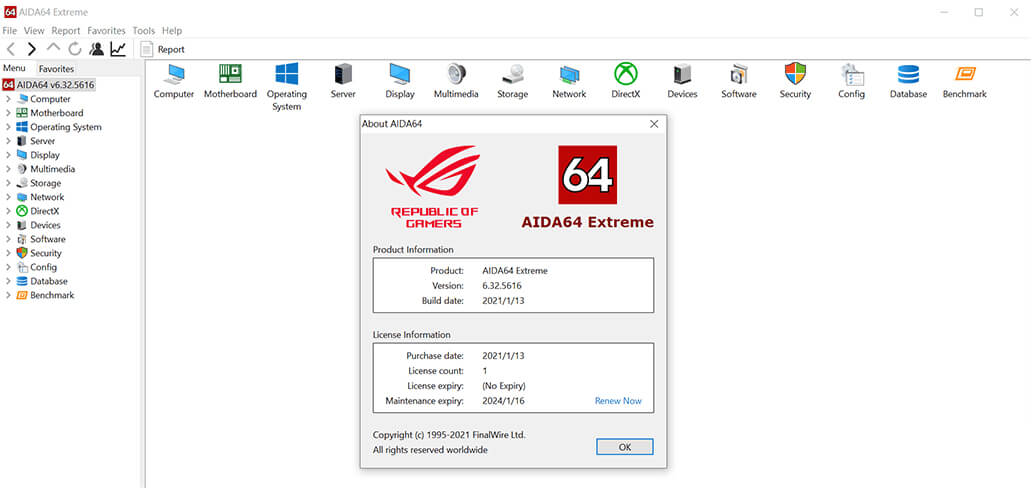
AIDA64 Extreme

ROG Maximus Z690 シリーズには、1年間のAIDA64 Extremeサブスクリプションが含まれています。これは、ハードウェアとソフトウェアに関する詳細情報を提供するツールであり、システム全体または個々のコンポーネントのパフォーマンスを測定するためのベンチマークです。 AIDA64 Extremeには、ハードウェアの問題を検出および防止するための監視および診断機能が含まれています。すべての重要なシステムセンサーをリアルタイムで追跡できるため、電圧の読み取り値、ファンの速度、温度情報をデスクトップに表示したり、専用ディスプレイやROGAIO液体クーラーのLCDパネルに送信したりできます。
*ROG Ryujin II以降の機種に対応しています。
AIDA64の詳細 >

  • ROG x AIDA64 Extreme
  • ハードウェアモニタ表示
AIDA64 Extreme UI
AIDA64 Extreme UI features Hardware Monitor Display

グラフィックカードホルダー

磁気ベース、調整可能なスライダーとヒンジを備えたROGグラフィックカードホルダーは、たるみを取り除き、最も必要な場所でサポートを提供します。
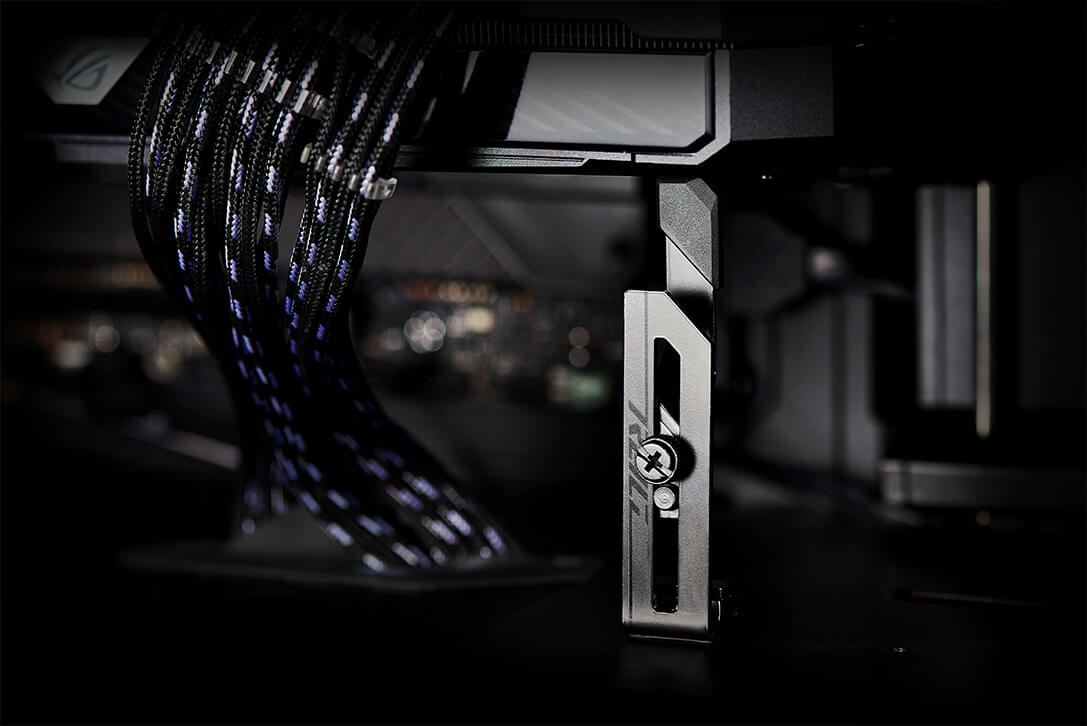
ROG Maximus Z690 Hero bundles ROG Graphics Card Holder

カスタマーレビュー

推奨製品

ROG MAXIMUS Z690 EXTREME

すぐに購入
詳細はこちら

ROG STRIX Z690-F GAMING WIFI

すぐに購入
詳細はこちら

ROG STRIX Z690-A GAMING WIFI D4

すぐに購入
詳細はこちら

ROG MAXIMUS Z690 HERO EVA EDITION

すぐに購入
詳細はこちら

ROG MAXIMUS Z790 EXTREME

すぐに購入
詳細はこちら

ROG MAXIMUS Z790 FORMULA

すぐに購入
詳細はこちら

ROG STRIX Z690-G GAMING WIFI

すぐに購入
詳細はこちら

ROG STRIX Z690-I GAMING WIFI

すぐに購入
詳細はこちら

関連製品

ROG Equalizer White Edition

すぐに購入
詳細はこちら

ROG Equalizer

すぐに購入
詳細はこちら

ROG Cronox ARGB

すぐに購入
詳細はこちら

ROG Cronox ARGB White Edition

すぐに購入
詳細はこちら

ROG GR20 Edition 20

すぐに購入
詳細はこちら

ROG Strix Helios II White Edition

すぐに購入
詳細はこちら

ROG Strix Helios II

すぐに購入
詳細はこちら

ROG Strix Helios II Hatsune Miku Edition

すぐに購入
詳細はこちら
Product has High-Definition Multimedia Interface

Disclaimer

  • 製品の外観や仕様は製品改善のために予告なく変更することがあります。
  • 各製品や使用条件により計算値が異なる場合があります。
  • 製品(電気、電子機器、水銀を含むボタン電池)は一般廃棄物に入れないでください。電子製品の廃棄については、地域の規制を確認してください。
  • このウェブサイトに表示されている商標記号(TM、®)は、テキスト、商標、ロゴ、またはスローガンという単語が、共通法の保護の下で商標として使用されているか、米国および/またはその他の国/地域で商標として登録されていることを意味します。
  • HDMI、HDMI High-Definition Multimedia Interfaceという語、HDMIのトレードドレスおよびHDMIのロゴは、HDMI Licensing Administrator, Inc.の商標または登録商標です。
  • 米国およびカナダでは、米連邦通信委員会(Federal Communications Commission)およびカナダ産業省(Industry Canada)の認証を受けた製品が販売されます。現地で購入可能な製品については、ASUS USAおよびASUS CanadaのWebサイトをご覧ください。
  • すべての仕様は、予告なしに変更されることがあります。実際の製品内容につきましては、サプライヤーにお尋ねください。製品はすべての国地域で入手できるわけではありません。
  • 仕様や機能は、モデルによって異なります。すべての画像はイメージです。詳細は仕様をご確認ください。
  • 基板色、同梱ソフトのバージョンは予告なく変更する場合がございます。
  • 前述のすべてのブランド名および製品名は、各社の商標または登録商標です。
  • 特に明記されない限り、すべての性能表示は理論上の性能に基づくものです。実際のパフォーマンスとは異なる場合があります。
  • USB 3.0、3.1、3.2、および/またはType-Cの実際の転送速度は、ホストデバイスの処理速度、ファイル属性、およびシステム構成と動作環境により異なります。
    1. > Gaming マザーボード
    2. > マザーボード Filter
    3. > ROG MAXIMUS Z690 HERO
メールアドレスを入力
新規登録

Please enter a valid email address.

  • ROGについて
  • NEWSROOM
  • ホーム
  • facebook
  • instagram
  • twitter
  • youtube
  • 特定商取引法に基づく表記
  • 個人情報保護方針
  • ご利用条件

©ASUSTeK Computer Inc. All rights reserved.