What is the quietest ROG gaming laptop?

Everyone values different things when shopping for a gaming laptop. Performance is obviously crucial, and portability can make or break the experience if you’re constantly on the go. But many of our users also wonder: which model runs the quietest? When it comes to ROG laptops, the answer isn’t as simple as picking a single model — they're all optimized for the chassis and the chips inside, so the conversation extends beyond decibels. Here’s what to think about when hunting for a gaming machine that keeps noise down.
Quick answer: There's no single "quietest" ROG laptop. Noise depends on your configuration and priorities more than any one model. Consider these items:
- GPU tier is a major factor: a laptop configured with a GeForce RTX 5090 will likely run louder than one with an RTX 5060. Expect a small noise bump with each step up the GPU stack.
- Laptop family plays a role: the compact ROG Flow Z13's ultra-efficient APU makes it one of the quietest machines in the ROG lineup. On the flip side, ROG Strix laptops’ larger chassis give them especially strong cooling headroom.
- You can tune noise output yourself: Armoury Crate puts fan curves, power limits, and operating modes in your hands, including a one-click Silent mode.
How ROG tunes laptops for cooling and acoustics

Throughout the ROG laptop lineup, from ultra-portable stunners to flagship powerhouses, we optimize our cooling systems to hit carefully considered acoustic targets under real-world workloads. Fan curves, thermal solutions, and power profiles are all calibrated to deliver the best balance between performance, temperatures, and noise. We do a lot to keep even our thinnest gaming laptops cool and quiet, ensuring a great experience no matter which machine you grab. With that in mind, our noise targets may vary slightly from model to model depending on a variety of factors.
First and foremost, the configuration you choose can have a significant effect on the amount of fan noise you experience. A laptop with a beastly GeForce RTX 5090 will likely run louder than one with a more entry-level GeForce RTX 5060. Each notch up the GPU stack you go, expect a small noise increase. Consider this when deciding which laptop GPU is right for you. This will be the biggest contributor to noise levels.
Also consider your model’s age. Many of our laptops change year to year as we incorporate new designs and cooling systems. Newer editions may feature different cooling technologies and aim for different noise targets than older hardware.
Which family of ROG laptop you opt for also plays a part in the equation. For instance: the ROG Flow Z13’s ultra-efficient APU provides some of the quietest performance we offer across our lineup, giving this two-in-one gaming laptop-tablet hybrid an edge when keeping noise down. Among our more traditional laptops, ROG Strix machines offer impressive cooling potential thanks to their larger size, keeping noise down especially when under more moderate load — and giving you more headroom to tinker with fan curves (more on that in a moment). But all of our laptops feature a plethora of cooling innovations to provide a comfortable experience, so whether you go with a Flow, Strix, or Zephyrus, you’ll have a good time.
With all these variables in play, there’s not necessarily one specific answer to “Which laptop is the quietest,” especially when other features may be just as important to your daily life. So the real question to ask is: “Which ROG laptop fits my style?” If you want peak portability, a thin and sleek Zephyrus is a great match. If you want max horsepower and upgradeability, a Strix machine gives you headroom. For unparalleled versatility, the Flow series keeps things light and flexible. And then no matter which model or configuration you opt for, you can tune it to fit your noise needs. Here's how.
Tinker with performance profiles to go even quieter

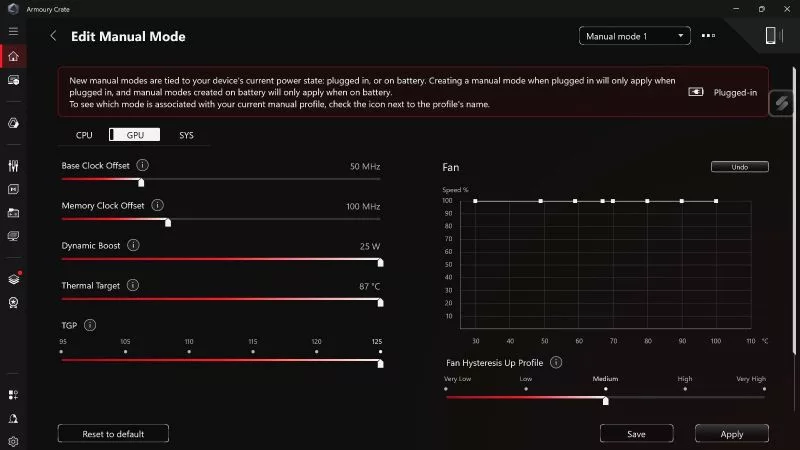
If you’re the type who likes to fine‑tune your machine, you can absolutely push things even further. Our Armoury Crate app gives you direct control over fan curves, power limits, and operating modes, letting you shape the acoustic profile to your liking.
You don’t need to be a tech wizard to get started. Any gamer of any skill level can wield Armoury Crate with confidence. For example: When you’re playing lightweight titles or doing basic tasks like web browsing, Armoury Crate lets you activate the ultra-quiet Silent mode in a single click. This is a convenient option if you don’t want to manually mess with wattage, fan curves, and other settings. Read up on what Armoury Crate’s convenient operating modes can do for your laptop.
But enterprising users can go even further than that. Want cooler temps? Boost the fans beyond their standard speeds. Want whisper‑quiet operation? Pull back wattage and switch to Manual mode to craft your own fan curve.
The Strix series offers the most wiggle room to play with these sliders thanks to its machines’ larger chassis and beefier cooling hardware. This lets you maximize noise reduction while keeping reasonable performance targets. But you can still experiment on a Zephyrus or Flow device if you prefer a slimmer laptop. For example, crank the wattage all the way down for silent web browsing on a Zephyrus G14, then boost it back to max during gaming sessions. A few minutes of tweaking in Armoury Crate can make a noticeable difference in how quietly your system runs during gaming sessions.
Explore other ROG gear for ultra-quiet alternatives

At a certain point, physics steps in. A laptop’s cooling system, no matter how advanced, still has to move heat out of a compact chassis. If your dream is near‑silent gaming, you might be happier stepping outside the laptop category entirely.
A gaming handheld like the ROG XBOX Ally runs cool and quiet thanks to its ultra‑efficient APU, and it’s still more than ready for AAA gaming. Alternatively, if you want the quietest possible ROG gaming experience, a desktop with liquid cooling gives you massive thermal capacity and the ability to run fans at extremely low speeds. With a custom‑tuned loop or a high-end AIO, you can build a powerful rig that’s practically silent.
That’s the thing about ROG gear: we love quiet gaming just as much as you, so we give you the means to have it in whichever format you like. Pick up any recent ROG laptop with confidence — they’re all quiet enough to deliver quality gaming experiences. Use Armoury Crate to tweak settings further, if you enjoy fine-tuning. Or check out handhelds and desktops for the absolute quietest gaming possible. No matter which way you go, you’re in for a great time.
FAQ
Which ROG laptop family is the quietest?
The ROG Flow Z13's ultra-efficient APU gives it some of the quietest performance in the ROG lineup. ROG Strix laptops, thanks to their larger chassis, offer strong cooling headroom too, especially under moderate loads.
Can I make my ROG laptop quieter?
Yes. The Armoury Crate app gives you direct control over fan curves, power limits, and operating modes. Silent mode handles noise reduction automatically, or you can switch to Manual mode and pull back wattage and fan speed to craft your own whisper-quiet profile.
Which laptop family gives you the most control over fan noise?
The Strix series, thanks to its larger chassis and beefier cooling hardware, offers the most headroom for tuning fan curves. You can still tune a Zephyrus or Flow device — just with a bit less room to play with.
Are desktop PCs quieter than gaming laptops?
If near-silent is the ultimate goal, a liquid-cooled gaming desktop has the thermal capacity to run fans at very low speeds. This can enable it to run more quietly than gaming laptops handling similar loads.
Do quieter laptops sacrifice gaming performance?
Yes, to a point. The quieter you want a laptop to run, the more performance you may have to give up to get there. Minor tuning in Armoury Crate can sometimes shave off noise without touching performance, but a real cut in fan noise means pulling back the wattage going to the CPU and GPU, which lowers performance. That’s why it’s worth building manual profiles in Armoury Crate, to satisfy different situations. Enjoy Silent mode for everyday tasks and lighter titles, then switch to a higher-wattage profile for demanding games.
Author
Popular Post
AMD FSR™ Upscaling 4.1 is coming to the ROG XBOX Ally X and X20 in preview

Innovate. Perform. Dominate: Celebrate 20 years of gaming with the ROG Edition 20 lineup of PC components and gear

How to boost gaming performance on the ROG Ally or ROG Xbox Ally
What is the ROG logo? The design behind the Fearless Eye
How to adjust your laptop's P-Cores and E-Cores for better performance and battery life
LATEST ARTICLES
Best ROG gaming laptops by budget: entry, mid-range & flagship picks
With so many ROG gaming laptop choices, it's easy to find a machine that fits your budget and best serves the way you play.
How to unlock the maximum TGP of your ROG gaming laptop in Armoury Crate's Manual Mode
If you want to push your laptop GPU's Total Graphics Power (TGP) and CPU wattage to its maximum, Manual Mode in Armoury Crate will get you there.

How to configure your ROG XBOX Ally X20's OLED display for the best HDR picture quality
Wondering how to set up HDR on your ROG Xbox Ally X20? Here's how to get the best picture from its OLED display, plus Auto HDR and OLED Care tips.