What is a vapor chamber, and how does it improve my PC’s cooling?
Every computer needs cooling – those high-performance chips produce heat, and the heat must be expelled from the system to reach peak performance. Traditionally, computers dissipate heat with a system of heat pipes and heatsink fins, with a few fans to keep air moving. But here at ROG, we’re turning more and more to vapor chambers for even cooler temperatures. Here’s how they work.
How traditional heatpipes work
To understand why vapor chambers are so awesome, it helps to understand the more typical heatpipe-and-heatsink system works.
When a CPU or GPU cranks up, it produces heat, which must be drawn away from the chip to avoid overheating and performance throttling. A thermal interface material, like thermal paste or liquid metal, acts as a bridge between the chip and the cooling system, drawing that thermal energy up to a series of copper tubes called heatpipes. Inside the vacuum of these pipes, a small amount of water rapidly boils when exposed to the chip’s heat. This change in pressure forces the water vapor toward the cool end of the heatpipe, where a series of metal fins called a heatsink absorb and dissipate the heat, usually with the help of fans blowing the hot air out of the system.
Once the heat dissipates, the vapor cools down, condenses back into a liquid, collects on a series of wicks inside the heatpipe, and travels back to the chip, where the cycle begins again. This all happens extremely quickly—much quicker than heat transfer in a solid piece of metal — making heatpipes an efficient, cost-effective cooling solution. Heatpipes are also extremely versatile, since they can curve around to reach other components inside the system.
Every ROG laptop comes with our Intelligent Cooling technology built in, which optimizes every step of this process for ultra-efficient heat dissipation without excess noise. For desktop PCs, many of our graphics cards use a similar system of heatpipes and fins to serve the same purpose in a larger build.
How vapor chambers work
Sometimes, though, we want even more cooling power – and that’s where vapor chambers come in. While typical heatpipes are very efficient, they’re still limited by the tight area inside your device. The walls of each pipe take up precious space, and each curve in the pipe lowers its efficiency somewhat. That means our engineering team works hard to find the most efficient route from point A to point B every time we design a laptop or graphics card.
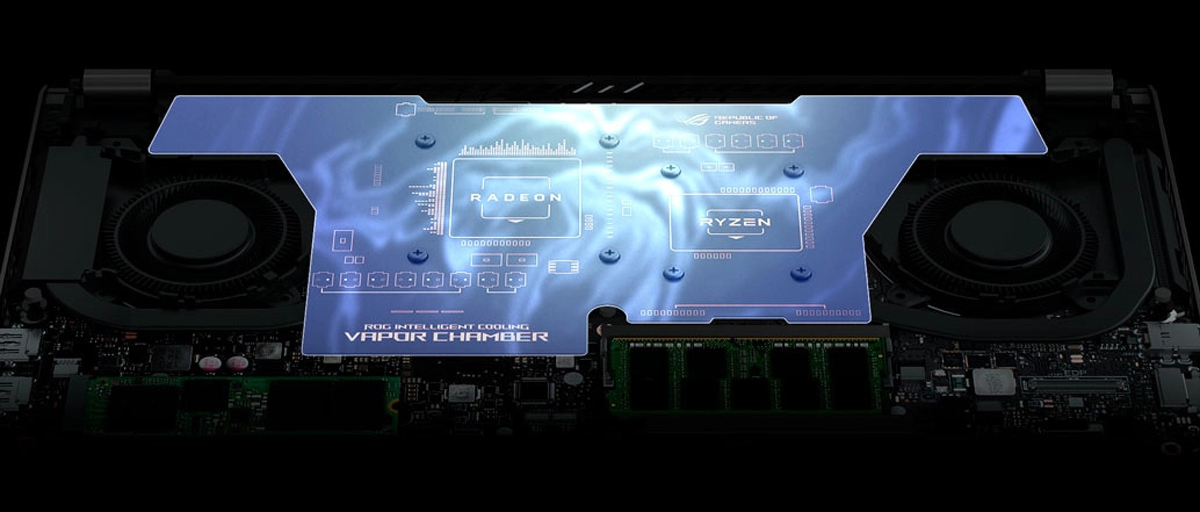
Vapor chambers overcome these limitations because, as their name suggests, they consist of one large chamber, spreading across a larger area. This not only allows them to carry more heat — because you can create a larger total vacuum in which to distribute it — but it also allows you to cover more of the motherboard. That means fewer hot spots on the surface of the laptop and better cooling for crucial components like the voltage regulator modules (VRMs). Vapor chambers may still use heat pipes to distribute thermal energy to the final heatsink, but they can use them much more efficiently since the heat pipes don’t have to be as close to the heat source itself (that is, the CPU or GPU die).
This impressive efficiency is why we’ve built vapor chambers into some of our most ultra-compact devices, like the ROG Flow Z13 gaming tablet. A vapor chamber proves its worth when space is at such a premium, as they can coax maximum performance out of a thin and light device, and it’s what allows the Flow Z13 to be the world’s most powerful gaming tablet.

It’s also excellent at cooling high-powered components, like our latest ROG Strix GeForce RTX 4090 and RTX 4080 graphics cards. We used a vapor chamber to expel heat faster with less fan noise, keeping temperatures low for optimal performance. In fact, on our ROG Strix GeForce RTX 4090, we even milled some channels in the vapor chamber so its heat pipes have more direct contact with the surface, lowering temperatures even further than traditional vapor chamber designs.
Keep your cool
Every ROG device is tuned for the best possible performance we can eke out of it, given its intended use case. When heat pipes will do the job effectively, we make sure to pack as many as we can with efficient routing to dense heatsinks. And when a device calls for next-level cooling and performance, we call on vapor chambers to kick it into high gear — so you never miss a frame.